Updated October 29, 2026
This guide compares four Magnific alternatives for upscaling AI art, renders, and photos: cnaps studio, Topaz Gigapixel, Krea Enhancer, and Upscayl. Each one is compared on how much new detail it adds, how closely it stays to the source, what it costs at low volume, and what you give up next to Magnific. In short, the choice comes down to how much invention you want: creative upscalers add detail that was never there, while faithful ones sharpen what is. If you want to see both kinds side by side on your own image, cnaps studio runs six upscalers, including diffusion models that add generated detail, on its free plan. Magnific fits better if you rely on its creativity and resemblance sliders or on prompt-guided reinterpretation.
Why people look for an alternative
The reasons fall into four groups, and they lead to different tools.
How much the image should change. Magnific is built to add new detail, with sliders for how much, which suits concept art and renders. For product photos, faces, and logos, many people want the opposite: a sharper version of what is already there.
How it is priced. Since April 28, 2026, Magnific has been the name of the whole former Freepik platform, sold on credit-based plans that cover stock assets, generation, and upscaling together. Some people only need the upscaler.
Repeatability. Sliders give fine control on one image, but a catalog of images needs the same result every time, ideally without adjusting settings per file.
Where it fits. Some want upscaling next to generation, some inside a desktop editor, and some as one step in an automated pipeline.
How we compared
We compared every tool on the same five fields: what it is best for, how it differs from Magnific, what you give up, what it costs at low volume, and how much effort switching takes.
Details for each tool come from its official product, pricing, and documentation pages, checked October 29, 2026. Model specifications for cnaps studio come from our own model documentation and a test run on the same day.
The comparison images in this post show cnaps studio models only. We did not run the other tools for them.
Comparison at a glance
Switching effort is low across the board. An upscaler has no projects to migrate, though slider settings you rely on in Magnific will not carry over, so plan a short session to find equivalent results.
The four alternatives
cnaps studio
Best for: finding how much invented detail an image actually needs, by seeing creative and faithful upscalers side by side.
Why choose it over Magnific: it puts six open upscalers in one browser workspace, all on the free plan, and they cover the whole range from faithful to inventive:
- FiDeSR and CODSR are one-step diffusion upscalers that add generated detail while staying close to the source.
- PiSA-SR brings out texture in fabric, foliage, and compressed images.
- Swin2SR and SMFANet+ sharpen what is already there, with SMFANet+ fast enough for large batches.
- SwinIR reaches 3x and 8x for very small sources.
Send the same image through several of them and line the results up in Image Compare, then keep the one that looks right instead of tuning sliders until it does.
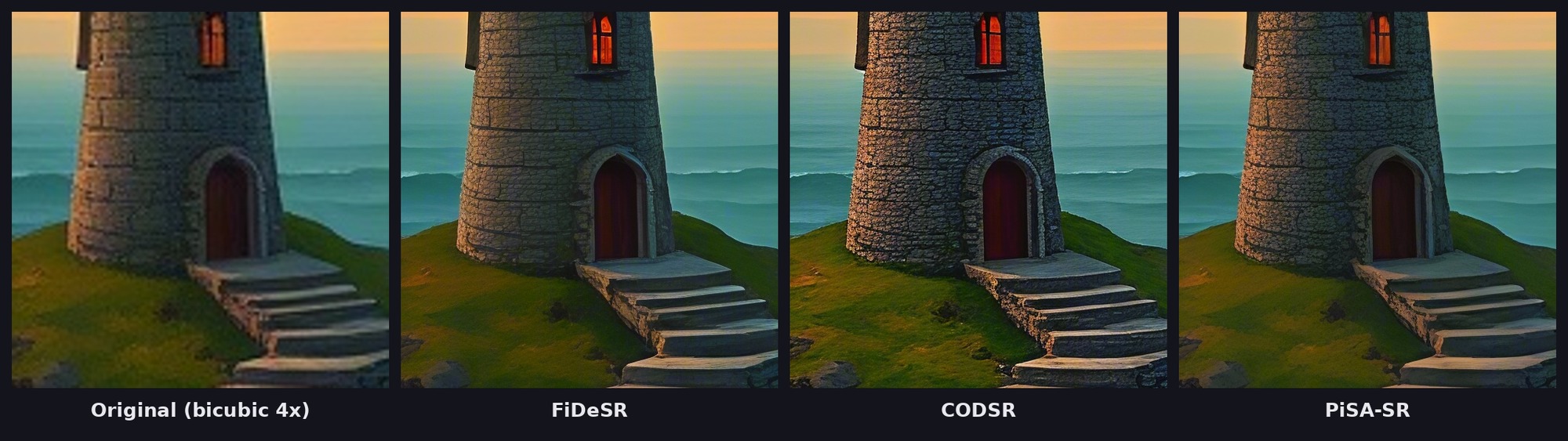
The three land at different points between faithful and inventive. PiSA-SR keeps the painterly look of the original with cleaner edges. FiDeSR draws crisp mortar lines into the stone while staying close to the source. CODSR invents the most, adding rough stone texture and individual blades of grass that the original only suggested.
Upscaling also chains with everything else on the platform. A flow can generate an image, upscale it, and turn it into a short video in one run. Batch Run, available from the Starter plan, applies the same flow to a whole folder, and any flow can be called through the API or MCP, for example from Claude.
What you give up: Magnific's creativity, HDR, and resemblance sliders, and prompt-guided reinterpretation of the image.
Price and limits: the free plan includes all six upscalers, runs one job at a time, and watermarks output. Paid plans start at $20 a month with Starter, which removes the watermark and adds Batch Run.
Switch if you upscale many images and want a consistent result per model, or want to compare creative and faithful upscaling before committing. Stay on Magnific if you rely on its sliders to push concept art into a new, more detailed version of itself.
Try all six upscalers in cnaps studio →
Topaz Gigapixel
Best for: photographers who want controlled upscaling on their own computer.
Why choose it over Magnific: Gigapixel offers around a dozen models, from faithful ones like High Fidelity to the generative Redefine, plus Face Recovery for portraits. It runs locally or in Topaz's cloud and plugs into Lightroom Classic and Photoshop.
What you give up: browser use without installing an app, and any free plan.
Price and limits: Gigapixel Personal is $149 a year, or $29 billed month to month.
Switch if you work on photographs and want a mix of faithful and generative models in one desktop tool. Stay on Magnific if your settings depend on its creativity and resemblance sliders.
Krea Enhancer
Best for: upscaling images you generated, in the same app you generated them in.
Why choose it over Magnific: the upscaler sits next to Krea's generation and editing tools, so there is no hand-off between apps, and it has its own controls for how much detail an upscale adds.
What you give up: output above 2K and commercial use on the free plan.
Price and limits: daily free credits with upscaling to 2K and no card. Higher resolutions and a commercial license start at $9 a month.
Switch if most of what you upscale is generated in Krea and destined for screens. Stay on Magnific if you already rely on Magnific's slider settings.
Upscayl
Best for: free, faithful upscaling on your own machine.
Why choose it over Magnific: it is free and open source, with no account, no watermark, and no usage cap, and it can upscale a whole folder at once.
What you give up: prompt-guided upscaling. Upscayl enlarges with Real-ESRGAN models and has no prompt input.
Price and limits: free under AGPLv3. It needs a Vulkan-compatible graphics card.
Switch if you want clean enlargements at no cost and have a capable GPU. Stay on Magnific if invented detail is the point.
When to keep Magnific
Some readers should not switch at all.
Keep it if your work depends on its creativity and resemblance sliders, for example turning a rough render or sketch into a fully detailed image. Keep it if you guide upscales with a prompt. And keep it if you already use the rest of the Magnific platform, where the upscaler comes with stock assets and generation on the same plan.
You also do not have to pick one. A common setup is Magnific for the few hero images that need reinventing and cnaps studio for everything else in volume, where a consistent model per image type keeps a catalog looking the same. For faithful upscaling of photos specifically, see our Topaz Gigapixel alternatives guide.
Before you switch: a short checklist
- Pick ten images that cover your real work: AI art, renders, product photos, and anything with faces or text.
- Decide for each one whether you want invented detail or a faithful enlargement.
- Run the same images through the candidate tool and compare at 100% zoom on hands, faces, text, and fine texture, where invented detail goes wrong first.
- Check how consistent the result is when you run the same image twice.
- Check the free tier's limits: image count, resolution, and watermark.
- Check commercial rights on the plan you would actually use.
Run one image through all six upscalers on cnaps studio and compare creative and faithful results in a single Image Compare view. Our 4× upscaling walkthrough shows why these checks matter: one model made the sample look sharper but also changed the lettering on the watch face.
FAQ
Which cnaps studio upscalers add new detail?
FiDeSR and CODSR are one-step diffusion upscalers that generate fine detail while staying close to the source. PiSA-SR adds strong texture on fabric, foliage, and compressed images. Swin2SR and SMFANet+ stay closest to the original and mainly sharpen what is already there.
Can I upscale AI-generated images in cnaps studio?
Yes. Any image can go through the six upscalers, and AI art often benefits from the diffusion models, FiDeSR and CODSR. You can also generate the image in the same flow and upscale it as the last step, so one run produces the final, full-size file.
How do I get the same upscaling result on every image?
Save a flow with the model and scale you chose, then run it on every image with Batch Run, available from the Starter plan. Each image goes through the same model with the same settings, so a catalog keeps one consistent look.
Is cnaps studio free for upscaling?
Yes. The free plan includes all six upscaling models. Free output carries a watermark and runs one job at a time. Paid plans start at $20 a month with Starter, which removes the watermark and adds Batch Run.
