Best MCP Servers for AI Image and Video Generation in Claude: Models, Free Access, and Workflows (2026)
Updated October 29, 2026
This guide compares five MCP servers that let Claude and other AI assistants generate images and video: CNAPS Studio, fal, Replicate, Runway, and Higgsfield. Each one is compared on which models it reaches, what you can use for free, how billing works, and what a single request can do. In short, many generation platforms now have an MCP server, and they differ most in whether one request runs one model or a whole multi-step workflow. If you want Claude to chain several models (generate, edit, upscale, animate) in one call, CNAPS Studio does that on its free plan. fal and Replicate offer much larger model catalogs, and Runway and Higgsfield bring their own models to paid subscribers.
Why generate images and video through MCP
The reasons fall into four groups, and they lead to different servers.
Staying in one conversation. Claude can write the prompt, call the model, look at the result, and adjust, without anyone copying text between tabs.
Repeatable work. A request that worked once can be run again on new inputs, which matters for product images, social cuts, and anything produced every week.
Chaining steps. Real jobs rarely stop at one model. A product shot might need background removal, a new scene, an upscale, and a short video.
Cost control. Some servers let the assistant check a model's price before it runs, and billing ranges from free tiers to prepaid credit to subscription plans.
How we compared
We compared every server on the same five fields: what it is best for, what sets it apart, what you give up, how it is priced, and how much setup it needs.
Details for each server come from its documentation and published setup guides, checked October 29, 2026. For CNAPS Studio, we generated every test image and video in our blog posts this week by calling its MCP server from Claude.
The comparison images in this post show CNAPS Studio models only. We did not run the other tools for them.
Comparison at a glance
The five servers
CNAPS Studio
Best for: asking Claude for a finished result that takes several models to make.
What sets it apart: a single MCP call builds and runs a flow, not just one model. Claude can wire a text-to-image model into an upscaler, a background remover, or a video model, run the whole chain, and save it as a flow you can rerun in the browser later. The server reaches 80+ models and 80+ processing tools across image, video, audio, and text, and on paid plans the same flow can then run on a whole set of inputs with Batch Run.
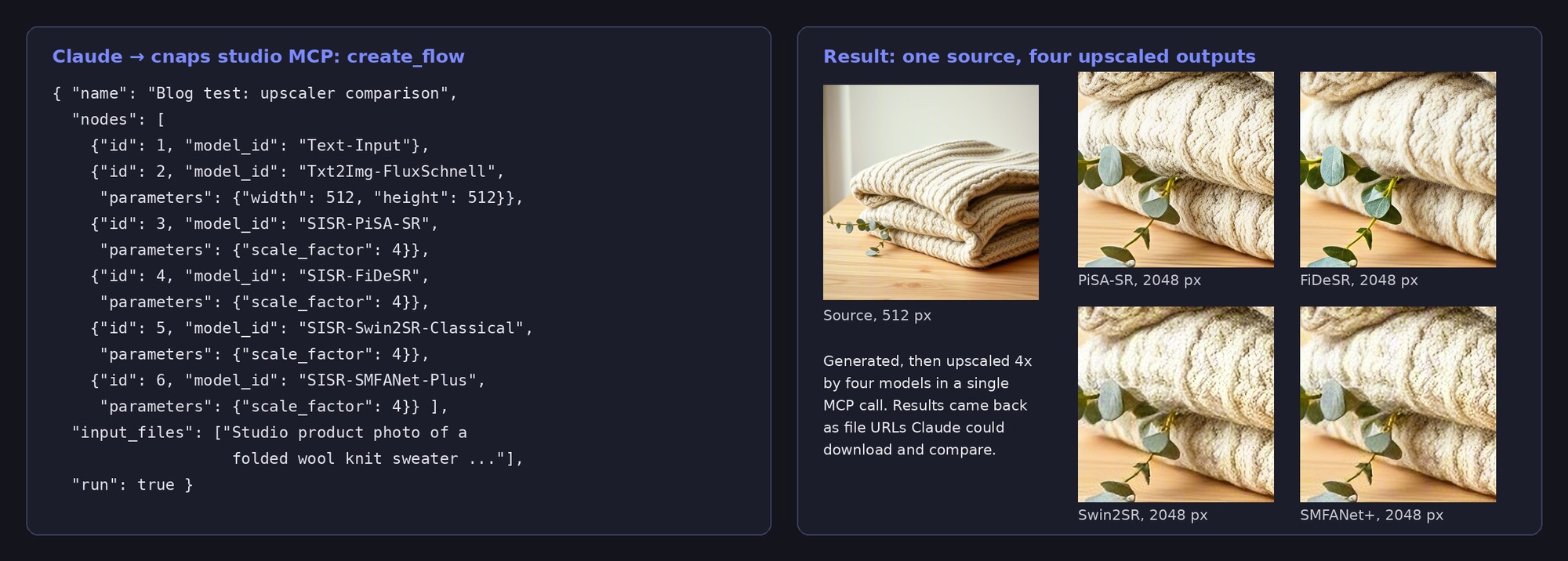
That one call created a six-node flow, generated the source photo, ran four upscalers on it at 4x, and returned each output as a file URL. The flow stayed in the account afterwards, so the same comparison can be rerun on a new photo from the browser or from Claude.
Local files work too. When an image or video sits on your computer, the server returns an upload link, and the uploaded file becomes an input to the next run. For a step-by-step setup, see our guide to using CNAPS Studio from Claude.
What you give up: catalog size. fal and Replicate host far more models.
Price and limits: MCP is included on the free plan, which runs one job at a time and watermarks output. Paid plans start at $20 a month with Starter, which removes the watermark and adds Batch Run.
Choose it if you want Claude to produce finished assets that need more than one model, or to turn a one-off request into a reusable workflow.
Try the CNAPS Studio MCP server →
fal
Best for: reaching a very large range of models, with the price visible before each run.
What sets it apart: fal's hosted server connects through a browser sign-in and exposes tools for search, pricing, generation, and job management across a catalog of more than 1,000 models. The assistant can call get_pricing to read a model's cost before it generates anything.
What you give up: saved flows. For multi-step jobs, the assistant connects the steps call by call within the conversation.
Price and limits: prepaid credit, with video models billed per second or per clip.
Choose it if you want a very large catalog of open and closed models behind one connection.
Replicate
Best for: running community and official models from a very large open catalog.
What sets it apart: Replicate's official hosted server works in Claude on the web and in desktop and coding tools, and puts thousands of models within reach. The server itself is free.
What you give up: a single price, since every model sets its own rate.
Price and limits: each run is billed at the model's own price on Replicate.
Choose it if you need a specific open model or a niche fine-tune.
Runway
Best for: Runway subscribers who want Gen-4.5 inside Claude.
What sets it apart: Runway's hosted server connects by URL and reaches Runway's own models along with partner models on its higher plans.
What you give up: open models and any free use.
Price and limits: available on Runway's Pro and Max plans, billed in Runway credits.
Choose it if your team already works in Runway and wants the same models from an assistant.
Higgsfield
Best for: creators already using Higgsfield's models and character tools.
What sets it apart: the Higgsfield server exposes its full model menu, along with upscaling, character tools, and audio such as voiceovers, and saves results to your Higgsfield assets.
What you give up: open models and free use.
Price and limits: billed against paid-plan credits.
Choose it if Higgsfield is already your main generation tool.
When a regular app is better than MCP
MCP is the faster route for repeatable work and multi-step jobs. A regular app is still better when you need to paint a mask by hand, scrub through a video timeline, or compare many results at a glance. Most people end up using both: the app to explore, and the MCP server to repeat what worked.
For one example of that split, see how we compared six upscalers on the same photo, where every test image was generated and upscaled through MCP.
Before you connect a server: a short checklist
- Write down the job you repeat most often, from input to finished file.
- Count how many models that job needs, and whether the server can chain them in one call.
- Check how the server handles local files, since many jobs start from your own photos.
- Check what the free tier allows and how runs are billed after it.
- Run the job once through MCP and once in the regular app, and compare time and result.
- Save what worked as something you can rerun, not just a chat you have to repeat.
Connect CNAPS Studio to Claude and ask it to build and run your first flow.
FAQ
Is the CNAPS Studio MCP server free?
Yes. MCP access is included on the free plan, along with every model in the catalog. Free output carries a watermark and runs one job at a time. Paid plans start at $20 a month with Starter, which removes the watermark and adds Batch Run.
What can Claude do through the CNAPS Studio MCP server?
Claude can search models, build a flow that chains several models and tools, run it, check its status, and read the results. It can also upload your local files through a link, rerun a saved flow on new inputs, and suggest a flow when you describe the job in plain words.
Can I reuse a flow that Claude built?
Yes. Every flow Claude creates through MCP is saved in your CNAPS Studio account. You can open it in the browser to adjust it, run it again from Claude, call it through the API, or, from the Starter plan, run it on a whole set of inputs with Batch Run.
Which AI assistants work with the CNAPS Studio MCP server?
Any assistant that supports remote MCP servers can connect, including Claude on the web, Claude Desktop, and Claude Code. Once connected, the same flows and models are available from each of them. For ChatGPT, follow our connection and first-workflow guide, which takes a pet photo through portrait generation and background removal.
