
Swin2SR — Image Upscaler AI Model
Swin2SR upscales 2× or 4× on Swin Transformer V2 and sits deliberately in the middle — sharper than the lightweight upscalers, quicker than PiSA-SR. The safe default when neither extreme fits. 10-30 seconds.
Demo
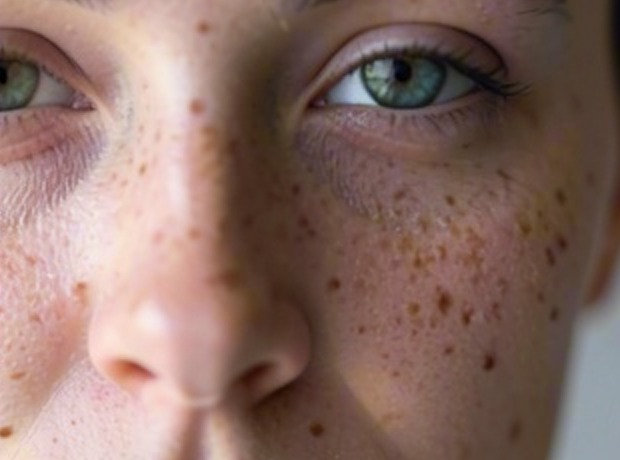
Enlarged 2x by ordinary resizing — 1:1 crop
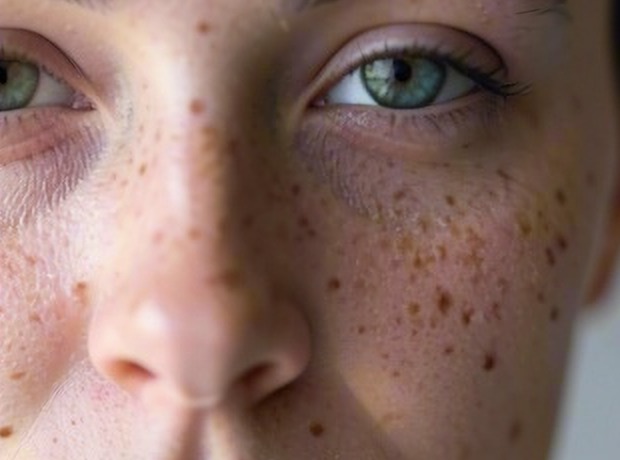
Enlarged 2x by Swin2SR — the same crop, same pixel size
What it does
Swin2SR enlarges an image by 2x or 4x and reconstructs the detail that a plain resize can only blur — edges stay edges, texture stays texture. It is built on Swin Transformer V2 and sits deliberately in the middle of the range: sharper than the lightweight upscalers, quicker than the diffusion-based ones.
It is the safe default when neither extreme fits. A run takes ten to thirty seconds. The scale factor selects a different set of weights rather than simply running the same model twice, so 2x and 4x are each trained for the job.
When to use it
- Enlarging photographs for print without visible softness
- Recovering usable detail from small or web-sized source images
- Preparing low-resolution assets for a higher-resolution layout
- A general-purpose first choice when the right upscaler is not obvious
Details
- CategoryImage Upscaler
- Year2022
- LicenseApache-2.0
Compliance & Provenance
- ProviderOpen-source · Specialized
- EU AI Act RiskMinimal Risk
- Art. 50 TransparencyNot applicable
Inputs & Outputs
- ImageInputimage
Low-resolution source image
- ImageOutputimage
Upscaled high-resolution image
Parameters
- scale_factorintegerdefault 2options: 2, 4
Upscale ratio (2/4)
Enlargement factor on each dimension. 2 (default) is faster, 4 enlarges more aggressively at higher compute cost.
Limitations
- It reconstructs plausible detail, it does not recover what was never captured. Text and faces at very small sizes come back sharp but not necessarily correct.
- Compression artefacts in the source are detail as far as the model is concerned, and enlarging can make them more visible rather than less.