ComfyUI is still the deepest tool in this space. If you need full control, keep it. If you don't, one of these five will probably save you time.
One note before we start: CNAPS Studio is one of the five, and it’s ours. We tried to be fair, and we say where we lose. If you chain a lot of models together, it’s the one we built for that.
Updated October 2026.
ComfyUI alternatives compared
Prices from each vendor's pricing page, October 2026. Check before you buy. Best for is the use we'd pick for each, not its only use.
First, what ComfyUI gets right
It is hard to overstate how far ComfyUI has come. It reports about 4 million users and more than 60,000 community-built nodes (source). It stays open source, and you can always run it on your own machine.
It also runs a hosted version, Comfy Cloud, so you don't need your own GPU to use it. You can start with 5 free GPU runs and no card. Standard is $20 a month, or $16 billed yearly (pricing), which is the same monthly price as our Starter plan. Cloud supports many popular community custom nodes, though not all of them.
That matters for this article. Comfy Cloud takes care of setup and VRAM, which are the first two reasons people leave. What it doesn't change is the graph, and we come back to that below.
If your workflow depends on a specific custom node or sampler, like one someone published last week, nothing here replaces ComfyUI.
Why people look for something else
- Setup and hardware. A local GPU, a Python environment, model files, and a few hours before the first image.
- Memory. Newer video models run out of VRAM on a 24 GB card, and each fix is a different workaround.
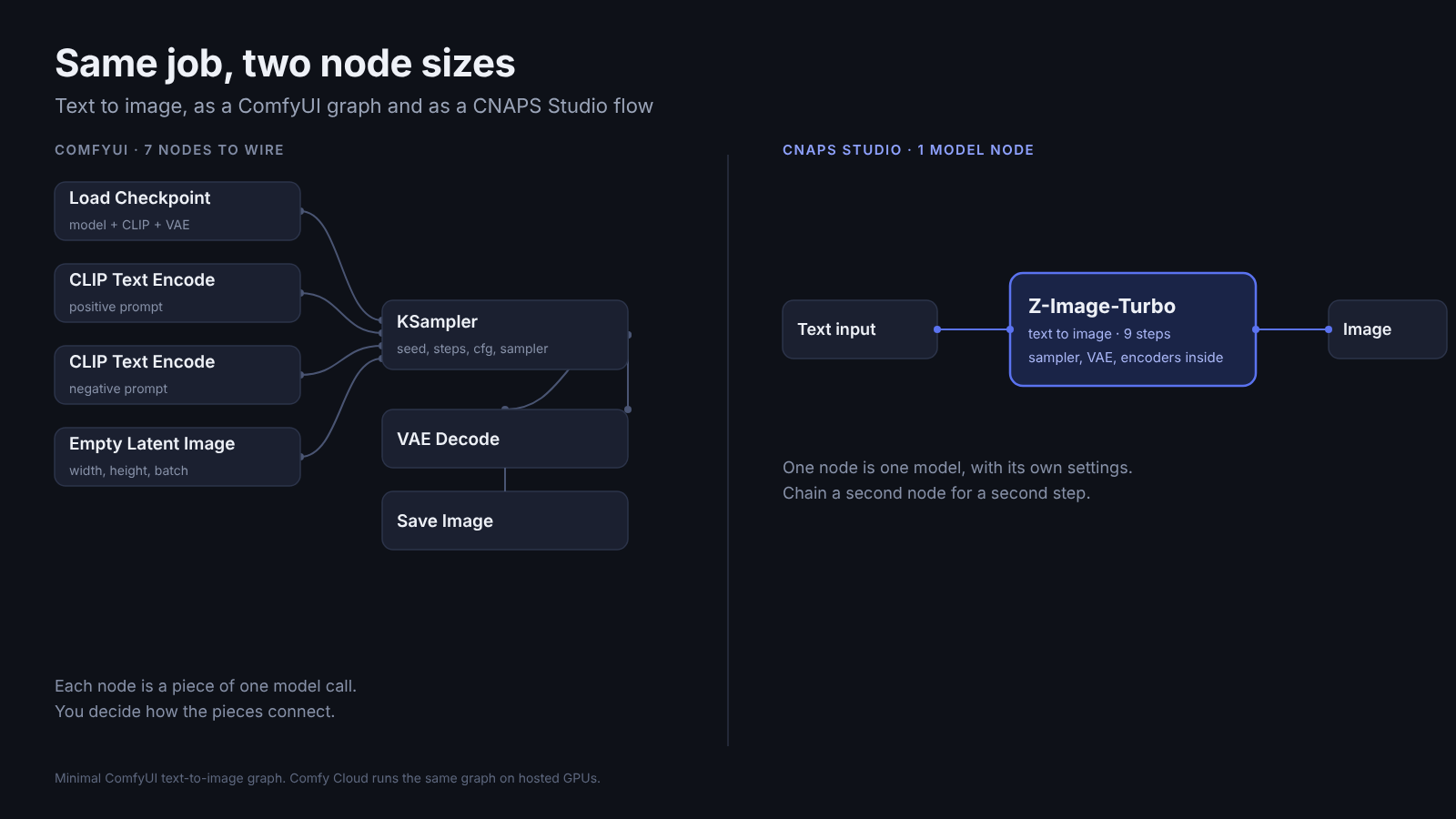
- The graph itself. Even with the GPU sorted, a basic text-to-image graph can be a checkpoint loader, text encoders, an empty latent, a sampler, a decoder and a save node. Templates cover the common cases, but when a result looks wrong you still have to know what each piece does.
Comfy Cloud answers the first two. The third is the same on the cloud and on your desk. Comfy's new agent, Comfy Agent, can now build a workflow inside ComfyUI for you (announcement). That helps with the first draft. When you need to fix or debug the result, you still need to understand the pieces.
1. Krea — fast, visual exploration
In one line: A browser tool for generating and refining images and video quickly, with a node editor (Nodes) for chaining steps.
Nodes, Apps and a Nodes Agent are on the Free plan, which gives 100 compute units a day. Many node types are marked Pro in the editor, including LLM Call and the text and audio utilities. Paid plans start at Pro, $35 a month or $21 billed yearly (pricing). The pricing page lists roughly 100 image and video models, including third-party ones.
Krea also makes its own model, Krea 2, and released open-weights versions of it in June under Krea’s own community license (overview). It takes up to four style references, which is good for keeping a look consistent.
Pick it if
- You work visually and want results in seconds, not a graph to build first.
- Style references and moodboards are how you steer.
Skip it if
- You want the full node set on a free account. Many utility nodes, LLM Call among them, are Pro only.
- You want everything on your own hardware. The app is hosted, and only Krea 2 RAW and Turbo run locally.
2. FLORA — a shared canvas for creative teams
In one line: A node canvas with an agent called FAUNA that builds the workflow for you while you watch.
You describe what you want and FAUNA lays out the nodes on a visible canvas, so you can change any step. FLORA launched it in April. The pricing page lists 60+ models and says new ones are available on release. Paid plans start at $18 per seat per month (20% off billed yearly) and include API and MCP access, real-time collaboration and unlimited projects (pricing). The free plan is small: text and image models only, with 3 projects.
Usage is a shared dollar pool, metered at each model's published rate. So a top video model costs far more than an image. Look at the rates before you plan a big project.
Pick it if
- You are an agency or brand team and want everyone on one canvas.
- You like the idea of an agent building the first draft of the graph.
Skip it if
- You want a flat, predictable cost per run. Spend moves with the model you pick.
- You want to try video or the API before paying. The free plan has neither, so you decide on a paid plan first.
3. Figma Weave — generation, inside Figma
In one line: Weavy, now owned by Figma, a node canvas for image, video and motion work.
Figma bought Weavy and relaunched it as Figma Weave. At Config in June it added the ability to run Weave tools inside Figma and to publish workflows to the Figma Community, where others can copy and extend them (Config notes). Models include Seedance, Sora, Veo, Flux and Ideogram.
Plans are credit-based: Free ($0, 150 credits a month, image models only), then Starter from $24 a month up to Team at $60 per user. Billing yearly saves about 30% (pricing). Figma and Weave are billed separately, and credits don't transfer (FAQ). The pricing page lists API access on Enterprise only.
Pick it if
- Your design work already lives in Figma.
- You want to share workflows with the Figma community.
Skip it if
- You need API access without an enterprise contract.
- You live outside Figma. The value is the connection.
4. Invoke — free, open source, yours
In one line: The closest thing here to ComfyUI's spirit: a free app that runs on your own machine, with a layer-based canvas and node workflows.
The hosted Invoke service shut down on October 31, 2025, and its founding team joined Adobe. The open-source project carries on under the community. Version 6.14, released August 25, added Wan 2.2 video, Flux.2 Dev, Krea 2 support, multi-GPU and Intel XPU support (release notes).
You trade convenience for ownership. It is free, runs offline and needs no account, but you bring the GPU and you do the updates.
Pick it if
- You want a friendlier local tool than ComfyUI and you have the hardware.
- Offline and no-account matter to you.
Skip it if
- You don't have a strong GPU.
- You need a hosted service with support. The company behind it no longer runs one.
5. CNAPS Studio — chain many models, no code
In one line: A browser workspace where each model is one node, so you connect a few steps and run them.
This is us, so here is the honest version.
The main difference from ComfyUI is the size of a node. In ComfyUI you build a model call out of pieces: a checkpoint loader, text encoders, an empty latent, a sampler, a decoder, a save node. In CNAPS Studio one model node wraps the whole model call. Background removal is a node. An upscaler is a node. A video model is a node. Connect them and run the chain. That is a different job from "no GPU", which every hosted tool here shares, Comfy Cloud included.
There are 80+ models across image, video, audio and text, and a separate set of about 80 tools for things like masking, resizing and blending. The models include open-weight ones such as FLUX, Qwen image editing, SeedVR2 upscaling, SAM 3.1 and BiRefNet. There are also external models (Gemini, Veo, Nano Banana, GPT Image, Claude) that you connect with your own provider accounts and pay the provider for directly.
Krea, FLORA and Weave also connect models on a canvas, so that alone isn’t a reason to pick us. Here is what we’d point to:
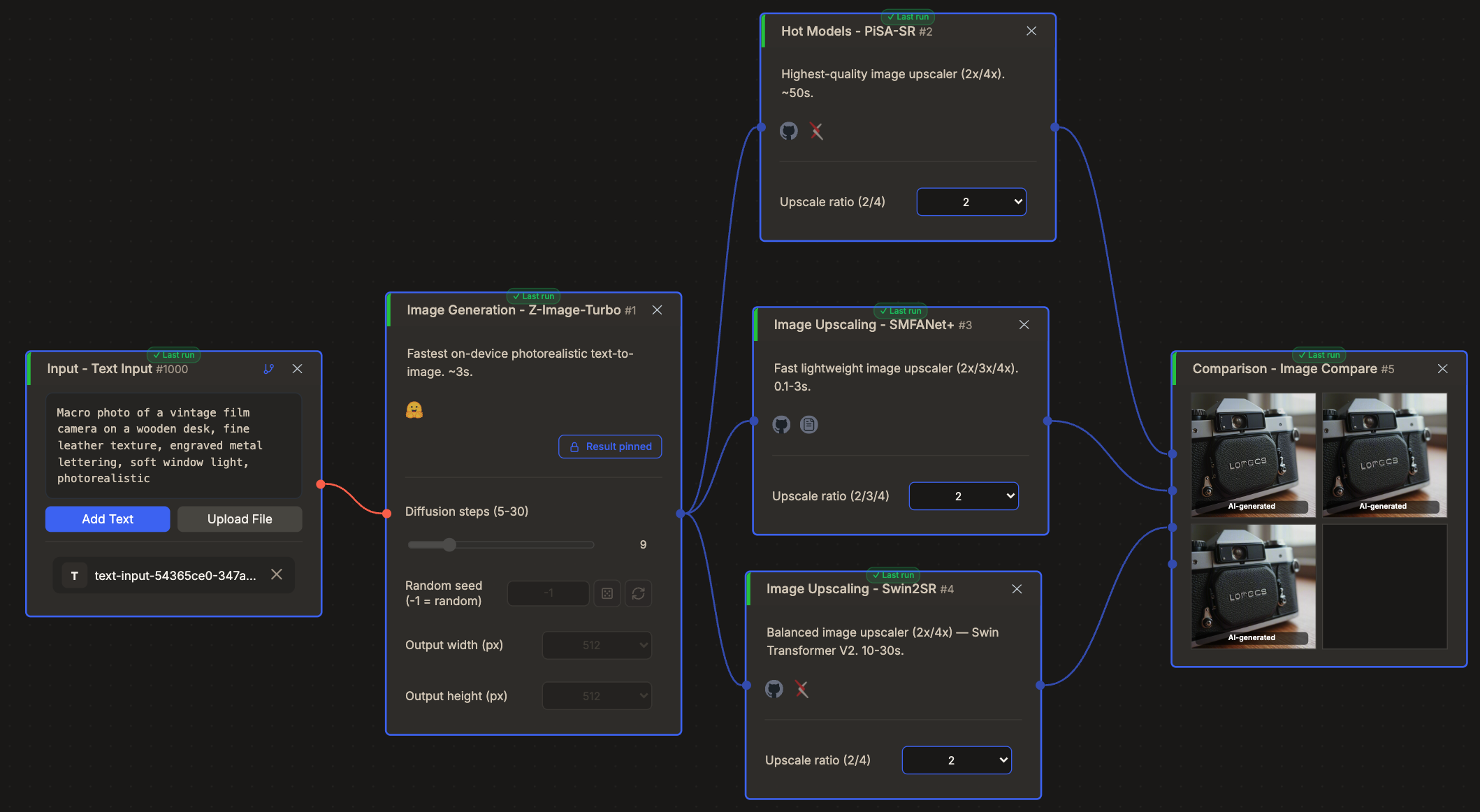
- Compare models side by side. Image, video and text compare nodes sit at the end of a flow. Run the same input through three upscalers and look at them together.
- API and MCP on the free plan. FLORA has them on paid plans only, and Weave lists API on Enterprise. We also connect to n8n and Zapier.
- Models and tools in one chain. The ~80 tools (masking, resizing, blending) are nodes too, so one flow can mix a model, a tool and another model without leaving the canvas.
- Nothing to install. Our hosted models all run on our cloud. If you can't use a cloud, the Enterprise plan can run on-premises, air-gapped.
Pricing: Free, $20 Starter ($16.67 a month billed yearly), $75 Pro and $200 Business, which includes 4 seats ($50 per extra seat). There are no credits. Usage is measured as GPU time, so heavier models use more. The Free plan has every hosted model, API and MCP access, but runs one job at a time and adds a watermark. Starter removes the watermark and adds Batch Run. External models bill through your own provider account. See cnaps.ai/pricing.
One real run
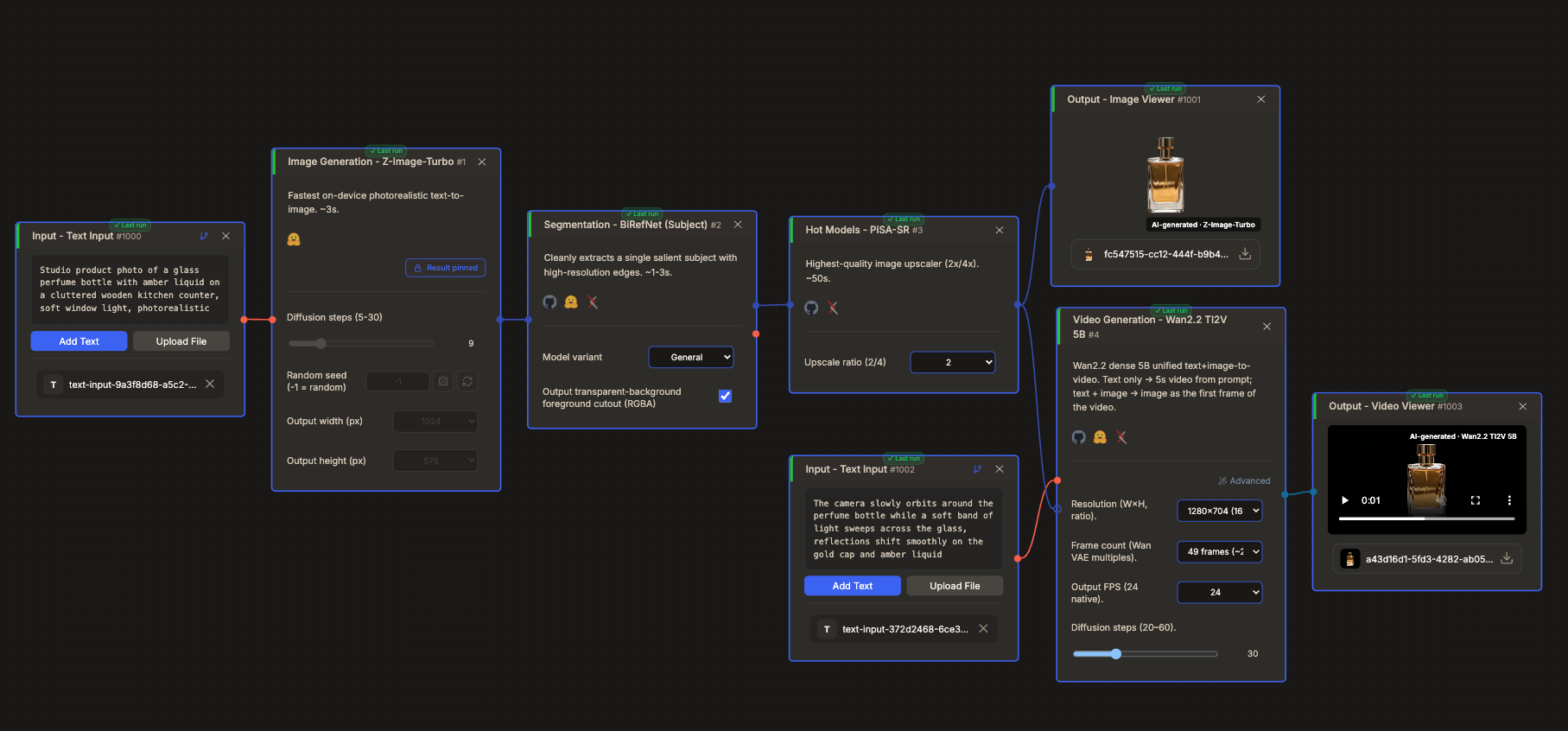
We built one chain and ran it: Z-Image-Turbo makes a product photo from a text prompt (1024×576), BiRefNet cuts out the bottle, PiSA-SR upscales the cutout 2×, and Wan 2.2 turns it into a 2-second clip. Four models, one run, 4 minutes from start to finish on a second run (5 minutes 11 seconds on the first). Nothing was installed and no model files were touched.
Want to try a chain like this? The free plan has every hosted model and needs no card. Try it on the free plan →

Where we lose
- No LoRAs, custom checkpoints or custom nodes. If your workflow depends on them, keep ComfyUI.
- No import of ComfyUI workflows. The two tools describe work at different levels, so a graph can't be converted one-to-one.
- A curated catalog. We have 80+ models, not thousands. We add models and drop old ones, and it isn't a model zoo.
Pick it if
- You want to build a multi-step pipeline (generate, remove background, upscale, animate) without installing anything.
- You want to compare models before you commit, or call your pipeline from code or an assistant.
Skip it if
- You need a specific LoRA, a custom node or fully offline work.
Also considered: local ComfyUI alternatives
Four more tools often come up when people look for a ComfyUI alternative. All four are free and open source, and you manage the setup and compute yourself.
AUTOMATIC1111 (Stable Diffusion WebUI). A widely used form-based UI, with a large tutorial and extension ecosystem. Its latest release, 1.10.1, is a bug-fix release (releases). A solid choice for SD 1.5 and SDXL work you already know.
Forge. A fork of AUTOMATIC1111 with the same layout and added Flux support (repo). If you like the A1111 interface and want newer models, look here. Check the supported models and recent activity before you install.
Fooocus. A simple starting point: type a prompt, get an image, few settings to learn. It is built entirely on SDXL and is now in bug-fix-only support, with no current plans to add newer model types (status). The project itself points people who want Flux to Forge, ComfyUI or SwarmUI.
SwarmUI. A Generate tab on top of a ComfyUI backend, with the full Comfy graph one tab away when you need it (repo). It supports image, video and some audio models and is MIT licensed. If your main complaint about ComfyUI is the graph, try this one.
How to choose a ComfyUI alternative
Three questions get you most of the way.
1. Do you have a GPU, and do you want to use it? If yes, and you like tinkering, stay with ComfyUI or try Invoke. If no, use a hosted tool. Comfy Cloud counts, if you are happy with the graph.
2. Are you making one image, or a pipeline? For a single image or video with a look you control, Krea is quick. For a chain of steps you will repeat, a node canvas (CNAPS Studio, FLORA, Weave) saves you time.
3. Who else touches the work? A design team in Figma points to Weave. An agency that wants one shared canvas points to FLORA. A developer who wants to try the API or MCP before paying points to CNAPS Studio, where both are on the free plan.
Use both
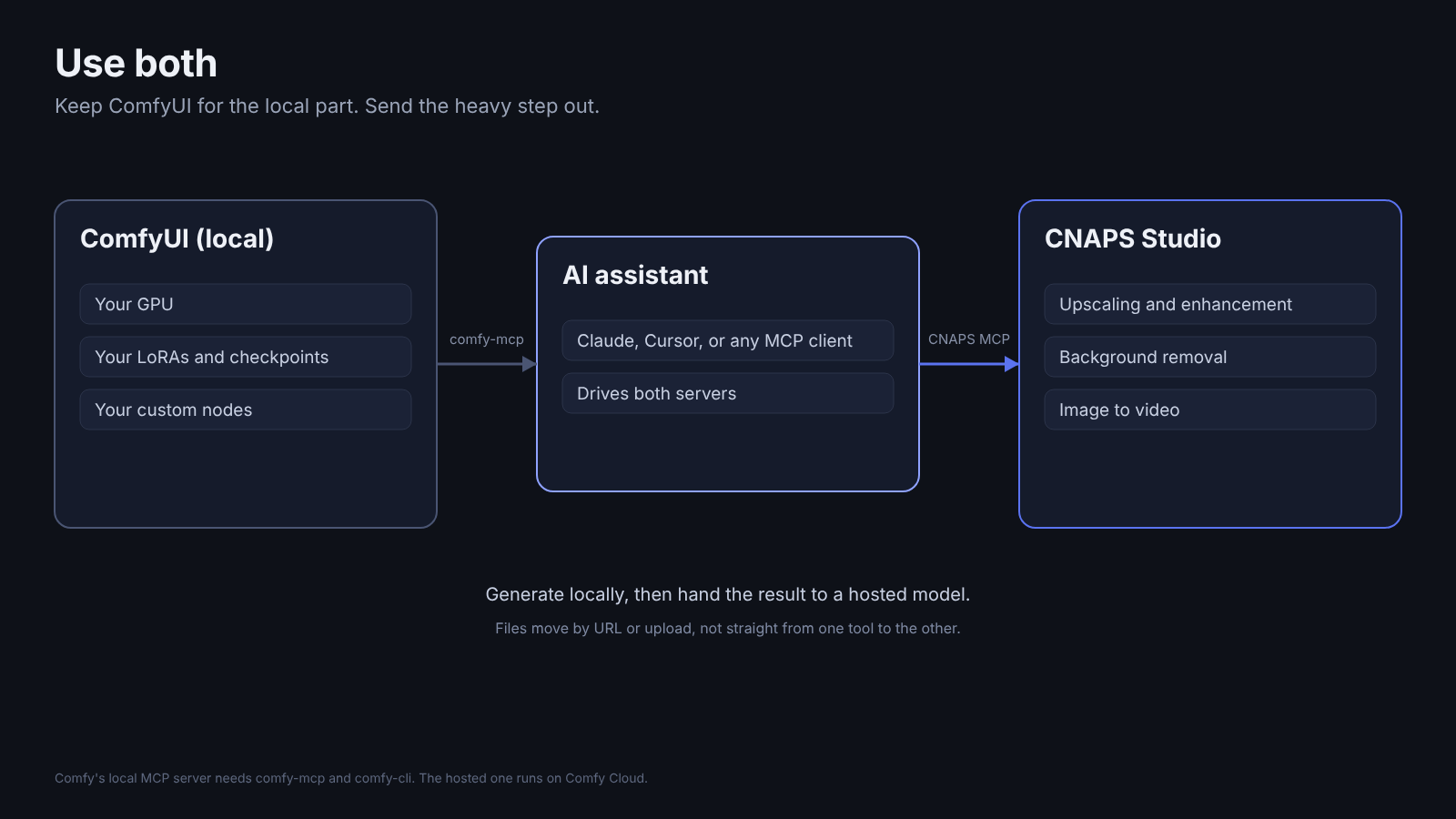
You don’t have to choose. Many people keep ComfyUI for the part only it can do, like a custom node you rely on, and send the heavy step somewhere else.
Comfy publishes official MCP servers (docs): a hosted one that runs on Comfy Cloud and needs a Comfy Cloud account, and a local one that reads your own custom nodes and models. CNAPS Studio has an MCP server too. Here’s what that looks like in a real Claude chat. Put both in one assistant, and it can generate locally, then hand the result to a cloud upscaler or video model.
One catch: right now an assistant can't pass a local file straight from one to the other. You hand over a URL or upload the file. It works, but it isn't seamless.
FAQ
What is the best ComfyUI alternative?
It depends on what you want to stop doing. For less setup, any of the hosted tools. For a free local tool, Invoke. For design teams, Figma Weave. For chaining many models, with API and MCP on the free plan, CNAPS Studio.
Can I import my ComfyUI workflows into these tools?
Mostly no. A ComfyUI graph depends on local files and community nodes, and other tools don't use the same building blocks. Plan to rebuild it. Where a tool says it reads ComfyUI files, test one of your real graphs first.
Is ComfyUI free?
ComfyUI itself is open source and free to run on your own machine. The cost is your GPU, your time and your storage. Comfy Cloud is the hosted version. You can start with 5 free GPU runs and no card, and Standard is $20 a month ($16 billed yearly). Check their site for current plans.
Can I use a ComfyUI alternative without a GPU?
Yes. Hosted tools run in a browser and manage the compute for you: Krea, FLORA, Figma Weave and CNAPS Studio. Comfy Cloud is hosted too, so you can keep ComfyUI itself and skip the hardware. With self-hosted tools such as Invoke, AUTOMATIC1111, Forge, Fooocus and SwarmUI, you arrange the compute and setup yourself.
Is there a free ComfyUI alternative?
Yes. Options you run yourself include Invoke, AUTOMATIC1111, Forge, Fooocus and SwarmUI, all free and open source. Hosted options with a free plan include Krea (100 units a day), Figma Weave (150 credits a month), FLORA (a small plan, text and image models only) and CNAPS Studio (every hosted model plus API and MCP access, one run at a time with a watermark). ComfyUI itself is also free to run on your own machine.
Is there something easier than ComfyUI?
If you run it yourself, Fooocus is a simple starting point (prompt in, image out), though it only runs SDXL. SwarmUI keeps ComfyUI's models behind a simpler Generate tab. In the browser, Krea is quick to get started with. If you want several steps in a row without wiring each model's internals, CNAPS Studio treats each model as one node. Or skip the editor and just ask Claude to build and run the flow.
Is AUTOMATIC1111 still a good ComfyUI alternative?
For SD 1.5 and SDXL, yes. It is stable and has a large extension ecosystem. For newer models, look at Forge, which keeps the same interface and adds Flux support.
Try CNAPS Studio free
Build your first chain on the free plan. It has every hosted model and no credit card, and takes a couple of minutes.
Try a practical example
Want to see how it works on your own image? Follow our 4× image upscaling walkthrough to compare PiSA-SR, Swin2SR and SMFANet+ in one ready-made CNAPS Studio flow. No local installation or model downloads required.
