
You shot in 8K. On a monitor the frame looks fine. In a headset it looks soft, so you run it through an AI upscaler — and it comes back worse, in two specific places that were fine before.
This is not a bad upscaler. It is a model doing exactly what it was trained to do, on an image that is not what it thinks it is.
An equirectangular frame is not a flat picture
A 360 photo arrives as a 2:1 rectangle. Longitude runs left to right across the width, latitude runs top to bottom down the height. It opens in any image editor and looks like a very wide landscape shot, which is exactly the problem: every general-purpose model treats it as one.
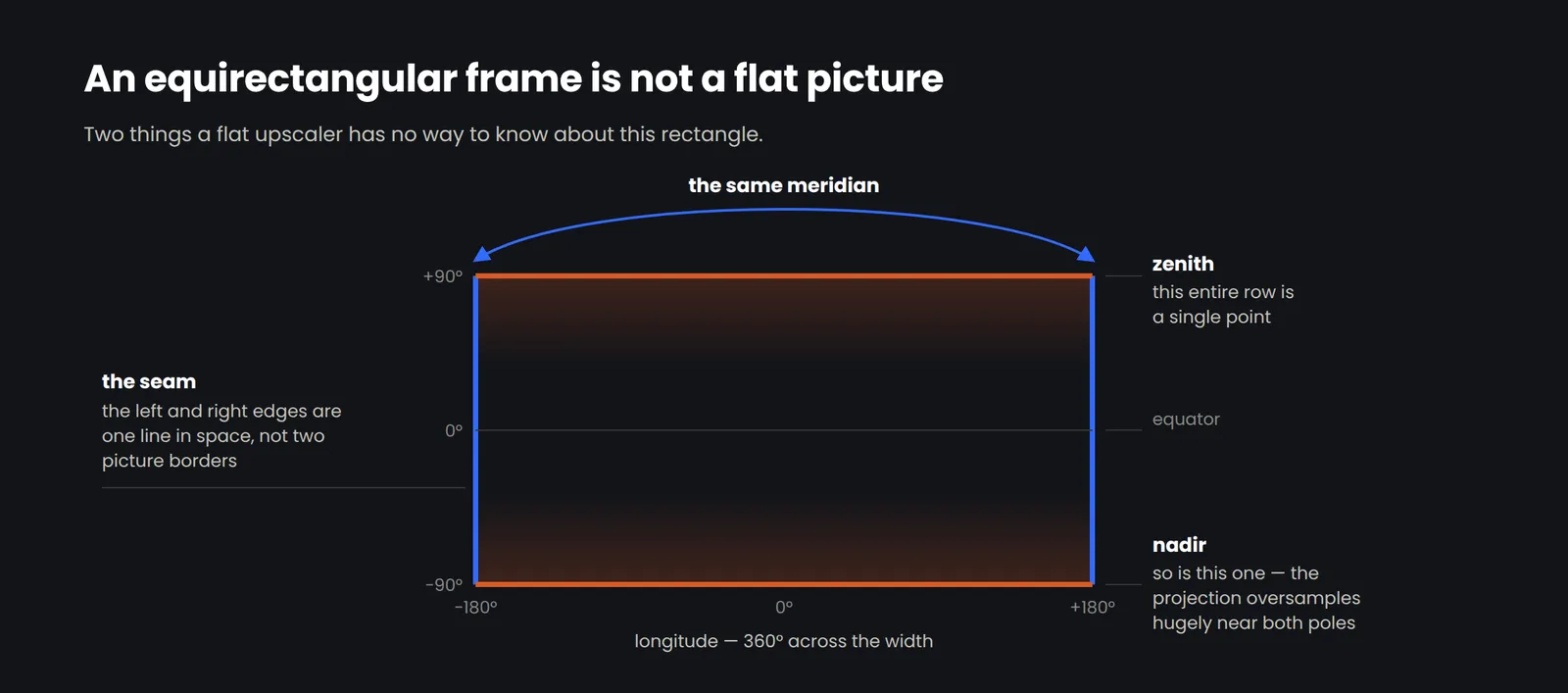
There are two pieces of information in that rectangle that a flat model has no way to know about. One is at the edges. The other is at the top and bottom.
The seam
The left edge and the right edge of an equirectangular frame are the same meridian. They are not the border of the picture — they are the place where the sphere closes. In the headset there is nothing there at all; a viewer turns around and walks straight through it.
A flat model sees two unrelated image borders. Whatever it does at an edge — pad it, mirror it, infer from the neighbouring pixels, taper the effect off — it does twice, independently, with different neighbouring content each time. The two sides no longer match.
On a monitor you will not notice. In a headset the viewer turns to face ±180° and there is a vertical line running floor to ceiling, and once someone has seen it they cannot stop seeing it.
Tile-based upscalers make this worse rather than better. Splitting a large frame into patches is how most tools handle resolution they cannot process in one pass, and it produces boundaries everywhere. Most of them are hidden in the middle of content. The one at ±180° is the only boundary a viewer can stand still and stare at.
The poles
The top row of an equirectangular frame is a single point in space. So is the bottom row. Every pixel across the full width of that first row maps to the same place: straight up.
That means the projection oversamples enormously as you approach the poles. Near the equator a pixel covers a real slice of the world. At 80° latitude the same pixel covers almost nothing, and the content is stretched sideways across the frame. This is not distortion to be corrected. It is the format working as designed.
A flat model does not know that. It sees smeared, stretched content and recognises the pattern as something it was trained to fix — motion blur, a swirl, a lens artifact. So it fixes it. The ceiling comes back with detail that curls, or a texture that spirals around the zenith, or a soft grey cap where a light fitting used to be. The nadir usually gets the tripod, and whatever the model decides to do with it.
Why 8K was already too soft
Here is the part that surprises people, and it has nothing to do with artifacts.
An 8K equirectangular frame is 8192 pixels wide, and those pixels are spread across a full 360 degrees. That works out to roughly 23 pixels per degree at the equator, and fewer everywhere else in the vertical field.
Meta publishes 25 pixels per degree for Quest 3. iFixit's teardown estimate for Apple Vision Pro is around 34. The figure usually cited as the retina threshold — the point where a typical eye stops resolving individual pixels — is about 60.
So an 8K master is already below what a current headset can display, before anything goes wrong. It is not soft because the upscaler failed. It was soft when you shot it. That is the actual argument for upscaling 360 material, and it is the reason the target is 32K rather than 12K or 16K: at roughly 89 pixels per degree, the limit moves back to the display where it belongs.
What correct handling looks like
None of this requires a bigger model. It requires the model to be told what it is looking at.
The wrap has to be continuous
The frame is processed as a sphere that happens to be stored as a rectangle, not as a rectangle that happens to be 2:1. Content wraps across ±180° so both sides of the seam are reconstructed from the same neighbourhood, and the join is checked after the fact rather than assumed.
Sampling has to follow latitude
The oversampling near the poles is measurable — it is a known function of latitude, not a guess. Reconstruction weighted by that measurement treats polar content as the compressed real detail it is, instead of as a defect.
Poles are rebuilt, not stretched
The zenith and nadir are reconstructed as the single points they represent. Stretching them wider is what produces the swirl.
The output is measured at full size
A 512-megapixel frame judged on a 2000-pixel crop tells you very little. Quality has to be verified on the delivered master, at the resolution it ships at, on defined measures rather than a proprietary score.
How to check your own output
You do not need our tool to run this. If you have an upscaled 360 frame sitting on disk right now, this takes about two minutes.
Open it in a 360 viewer, not an image editor
Turn to face ±180° — the direction opposite where the camera front was. Look for a vertical line. Look at it against a flat wall or sky, where it shows up most.
Look straight up, then straight down
Not at a thumbnail — in the viewer. Ceiling fixtures, sky gradients and floor patterns are where pole handling fails visibly.
Compare detail at the equator against detail at 60° latitude
If the upper third is noticeably mushier than the middle, the model treated the whole frame as one flat surface.
Check the aspect ratio is still exactly 2:1
Some tools quietly pad or crop, which breaks the projection for every downstream viewer.
FAQ
What is an equirectangular image?
It is the standard way a 360 photo or video frame is stored: a 2:1 rectangle where horizontal position maps to longitude and vertical position maps to latitude. It is the same projection used for world maps, and it has the same properties — areas near the poles are stretched, and the left and right edges join.
Why does my 360 photo look sharp on a monitor but soft in a headset?
Because a monitor shows you the whole frame at once, and a headset shows you a small slice of it filling your field of view. An 8K equirectangular frame is about 23 pixels per degree at the equator. Quest 3 displays 25, so the headset is resolving more detail than the file contains.
Can I just use a regular AI upscaler on a 360 image?
You can, and for a quick look it may be fine. Two things tend to break: the ±180° seam, because a flat model treats the frame edges as picture borders rather than as a join, and the poles, because the model reads the projection stretch as a defect and tries to correct it.
What resolution do I actually need?
It depends on the headset and how much of the sphere a viewer sees at once, but the arithmetic is simple: divide the frame width by 360 to get pixels per degree, then compare that to your target device. Current consumer headsets sit in the mid-20s to mid-30s, and roughly 60 is where a typical eye stops resolving pixels.
Does upscaling invent detail that was not there?
Any super-resolution model reconstructs plausible detail; that is what the technique does. The honest question is whether it stays faithful to the source. That is why the measurement here uses defined measures including PSNR, SSIM, MS-SSIM and LPIPS alongside perceptual scores, rather than a single proprietary index — source fidelity and perceptual quality get reported separately instead of averaged into one number that can hide a tradeoff.
What do I get back?
A 32K equirectangular master plus six 8K cubemap faces, so the result drops into engine and player pipelines without a separate conversion step.