
Meta released SAM 2 under Apache 2.0, so the weights are free to download and run on your own machine. Doing that means Python 3.10 or newer, PyTorch 2.5.1 or newer, a GPU box, and compiling a CUDA kernel during install. If none of that appeals, the same model runs in your browser on CNAPS Studio, included in the basic plan.
What makes this one unusual in our catalog is that it asks you nothing. The other text-prompted segmentation models here want a description before they will do anything. SAM 2 runs in automatic mask mode instead: hand it a photo and it returns a separate mask for every distinct thing it found, each with an ID, a confidence score between 0 and 1, and a bounding box. What comes back is an inventory of the scene rather than an answer to a question.
The cost is that you cannot aim it. It has no idea which of those masks is the one you were after, so the sorting becomes your job, done afterwards by color code or by coordinate. Five segmentation models sit in the CNAPS Studio catalog and this is the only one that hands you everything in the frame without being told what to look for.
What it actually is
A vision transformer reads the image into features and a mask decoder turns those features into masks. An automatic mask generator drives the pair: it seeds the image with candidate points, filters the resulting masks for quality and overlap, and returns what survives. Meta published the first checkpoints in July 2024 and replaced them with improved ones that September.
Four checkpoints ship, and choosing between them is a straight accuracy-for-speed trade. The smallest is roughly a sixth the weight of the largest and runs a little over twice as fast on Meta's own timing. In CNAPS Studio that choice appears as a model version setting with Tiny, Small, and Large.
The published numbers
Meta reports SAM 2 on three video segmentation benchmarks, all scored with J&F out of 100, a metric that averages how much of an object a mask covers against how closely it traces that object's edges.
On SA-V test the four checkpoints score 76.5, 76.6, 78.2, and 79.5. On MOSE validation they score 71.8, 73.5, 73.7, and 74.6. On LVOS v2 they score 77.3, 78.3, 78.2, and 80.6. Frame rates across the same four run from 91.2 down to 39.5 per second, measured on a single data-centre GPU.
Two caveats matter here. Every figure above comes from Meta's own repository rather than an independent leaderboard, so all of it is vendor-reported. And each of those benchmarks measures tracking one object through a video after somebody pointed at it on the first frame, while CNAPS Studio runs the still-image automatic mask mode, which none of those scores covers. Read them as evidence that the mask quality holds up, not as a grade for the job you are handing it.
How it compares to the other segmentation models here
The scores behind these five models sit on four different scales, and lining them up would be dishonest. J&F rates video mask overlap, cgF1 rates whether a model found every instance of a concept you described and nothing else, average precision rates detections against a fixed list of everyday classes, and a structure measure rates a single foreground cutout. Twenty of your own images through two or three of them settles it faster than reading four papers.
The practical split is clean. Reach for SAM 2 when you do not know what is in the frame and want all of it separated. Reach for SAM 3 or SAM 3.1 (Scene) when you can name the thing in a short phrase and want only that. Reach for RF-DETR Seg Medium when your objects fall inside the everyday-object list and speed matters most. Reach for BiRefNet (Subject) when there is one subject and you want it cut out cleanly against its background.
What to chain it with
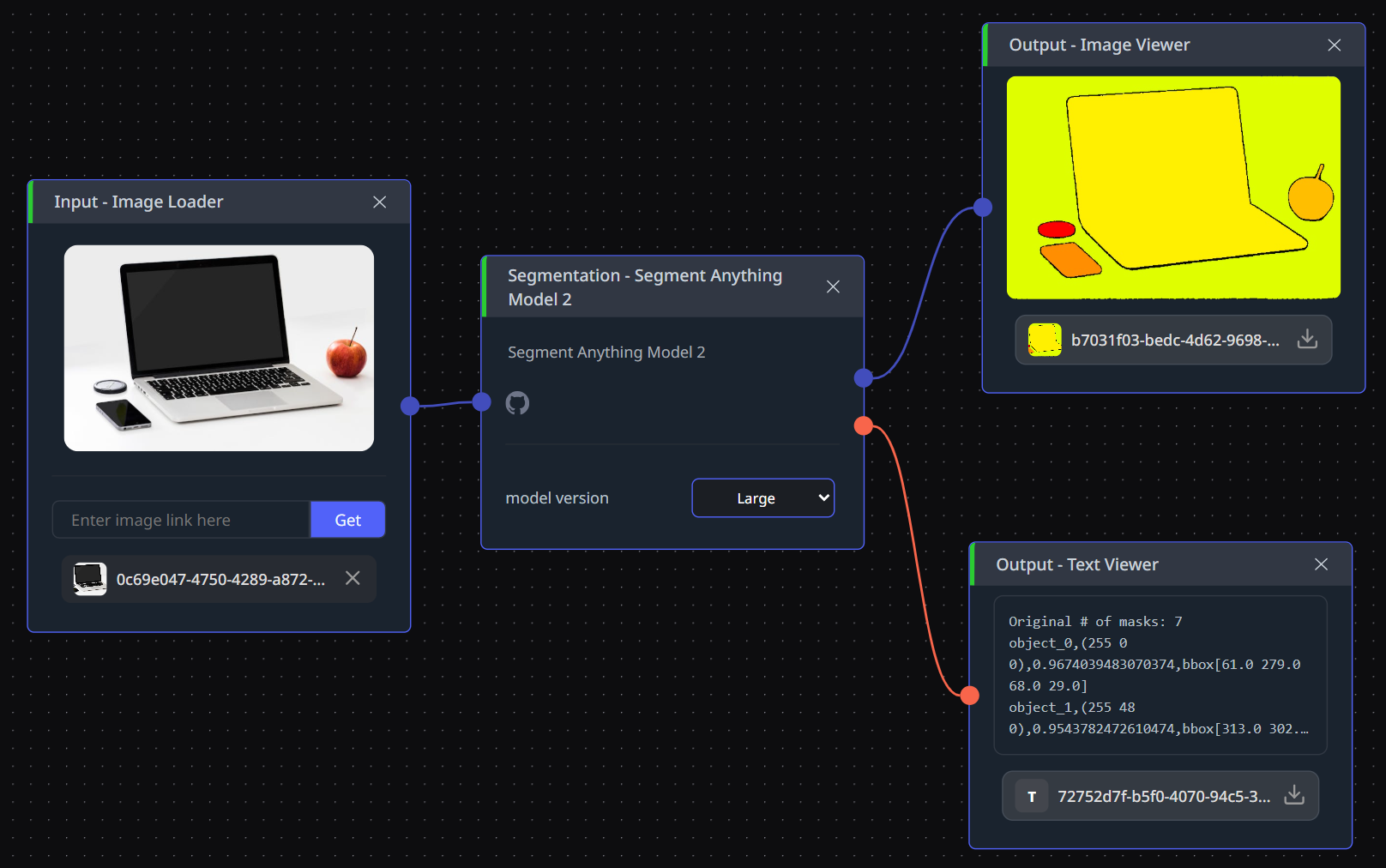
It takes one image and returns two things: a mask image for every object it found, and a text summary listing each object's ID, an RGB code, a confidence score, and a bounding box given as x, y, width, and height. The text half is how you pick which mask you meant.
Two chains come up constantly. The RGB codes feed Manual Color Picker or Color Pick by RGB Value, which pull one segmented region out as its own image, and that region goes on to Layer Compose for a composite or to PowerPaint or LatentDiffusion (Object Removal) to erase it from the original. The bounding boxes feed Image Crop by Coord, which cuts every object out separately, and those crops go to Object Classification or BLIP (Image Description) when you want each piece named rather than merely isolated.
Open SAM 2 in CNAPS Studio, run one of your own cluttered product photos through it at Large, then run the same photo through SAM 3.1 (Scene) with a text phrase and see which one leaves you less to sort.
Sources
- github.com/facebookresearch/sam2 for the Apache 2.0 license, the four checkpoint sizes, the frame rates, the J&F scores on SA-V test, MOSE validation and LVOS v2, the release dates, and the install requirements.
- github.com/ZhengPeng7/BiRefNet and github.com/roboflow/rf-detr for the licenses, sizes and metrics of the two models compared above.
- docs.cnaps.ai/ai-model-hub for the CNAPS Studio input, output and model version settings.