Wan2.2 TI2V 5B: a 720p video model small enough for one consumer card, and where to run it
Apache 2.0, weights free, commercial use allowed. Self-hosting is within reach of one consumer card: our docs give at least 24GB of memory for 720p on a single GPU such as an RTX 4090, with Wan's offloading options switched on, and under nine minutes for a five-second clip on that class of card. In your browser it runs on cnaps studio, included in the basic plan.
It is built to be small. One dense 5-billion-parameter model handles both text-to-video and image-to-video, and a high-compression video autoencoder squeezes each clip 64 times in space and time before the model sees it, which is how 720p at 24 frames per second fits in so little memory.
The costs are fixed choices. There is no soundtrack, output comes in two 720p sizes only, and an input image can set the first frame but not the last. Eight video generation models sit in the cnaps studio catalog, and this is the lightest one with a permissive license.
What it actually is
The 5B text-and-image-to-video member of Alibaba's Wan2.2 family, released in July 2025. Its autoencoder compresses 4 times in time and 16 by 16 in space, and patchification raises that to 4 by 32 by 32. Compared with its predecessor, the family was trained on 65.6% more images and 83.2% more videos.
An input image is encoded straight into the first frame's latents, so that frame stays locked to your picture while the rest of the clip moves. Prompts work in English and Chinese.
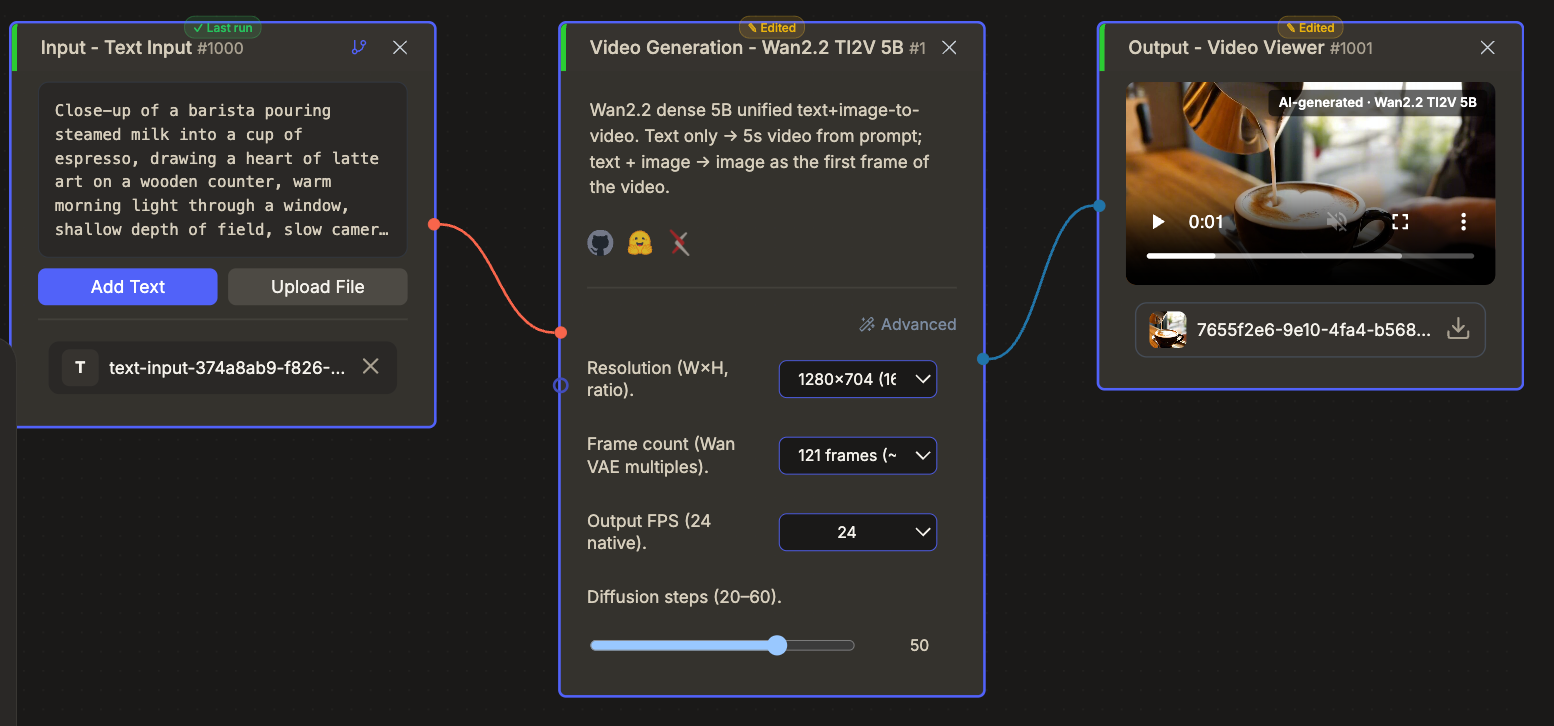
In cnaps studio you give it text and, optionally, a first-frame image. Output is 1280 by 704 or 704 by 1280. Length runs from 49 to 145 frames, default 121, about five seconds at 24 fps. Steps run from 20 to 60, default 50, guidance from 1 to 10, default 5, and a negative prompt adds to Wan's built-in one.
Try Wan2.2 TI2V 5B in cnaps studio →
The published numbers
Alibaba publishes its benchmark charts for this model only as images, without the numbers in text, and the Wan paper covers the previous generation. What it does state in text is about efficiency.
In the studio a five-second clip at the default 50 steps typically finishes in about three minutes.
The fair reading is a draft model chosen for speed and license, with quality you judge by eye. Its makers position this checkpoint on efficiency, and the Apache 2.0 license lets a draft go straight into a commercial project.
How it compares to the other video generators here
These four share no published test, so the table maps size, sound and license. The deciding questions are whether the clip needs audio and how much the license must allow.
Reach for Wan2.2 TI2V 5B for quick drafts, silent b-roll and anything that must ship under Apache 2.0. Reach for LTX-2.5 for 1080p with sound, MiniMax H3 for longer reference-driven clips, and Cosmos3 Nano to extend footage.
What to chain it with
Text and an optional still in, a silent 720p clip out, so it pairs naturally with sound and upscaling models.
Two chains suit it. Before it, Z-Image-Turbo can design the opening frame, which the model then holds exactly. After it, MOSS adds sound effects and Text to Music (ACE-Step 1.5) a score, and SeedVR2 3B can lift the 720p clip to 1080p or beyond.
Open Wan2.2 TI2V 5B in cnaps studio, run one prompt at 121 frames, then the same prompt with a first-frame image, and compare how much the picture holds.
FAQ
What does Wan2.2 TI2V 5B need to run locally?
One consumer GPU with at least 24GB of memory, such as an RTX 4090, with Wan's model offloading and CPU text encoding switched on. A five-second 720p clip then takes under nine minutes. Cards with 80GB or more can skip offloading. In cnaps studio it runs in the browser, included in the basic plan.
Why does my clip look slow at 16 fps?
The 16 fps option keeps the same frames and only changes how fast they play, so a 121-frame clip stretches from about five seconds to about seven and motion looks slower. Keep the default 24 fps for natural movement, and change the frame count instead when you need a longer clip.
How do I add sound?
Chain a sound model after it, since the output is silent. MOSS turns a sentence into a sound effect of up to 30 seconds, and Text to Music (ACE-Step 1.5) writes a score from a style prompt. For a clip that needs speech or sound generated together with the picture, use LTX-2.5 instead.
