
Helios Distilled: the same minute of video, generated faster, and where to run it
Apache 2.0, weights free on Hugging Face, nothing to sign. Running it yourself still means a data-centre GPU, because the 14 billion parameters do not shrink when a model is distilled, and the vendor's speed figures assume an H100. In your browser it runs on CNAPS Studio, included in the basic plan.
Distilled is a compression of the process rather than the model. Its sibling exposes a slider for how many denoising passes to run over each chunk, defaulting to 50. This variant collapses that into a fixed fast schedule, so there is no quality dial to turn and no decision to make. You get the same sixty-second ceiling and the same three input modes, in less time.
The cost is control. Resolution is fixed at 640 by 384 rather than chosen from eleven presets, the diffusion-step slider is gone, and the model card puts this variant at the efficiency end of the family rather than the quality end. Two Helios variants sit in the CNAPS Studio catalog, and this is the one for volume.
What it actually is
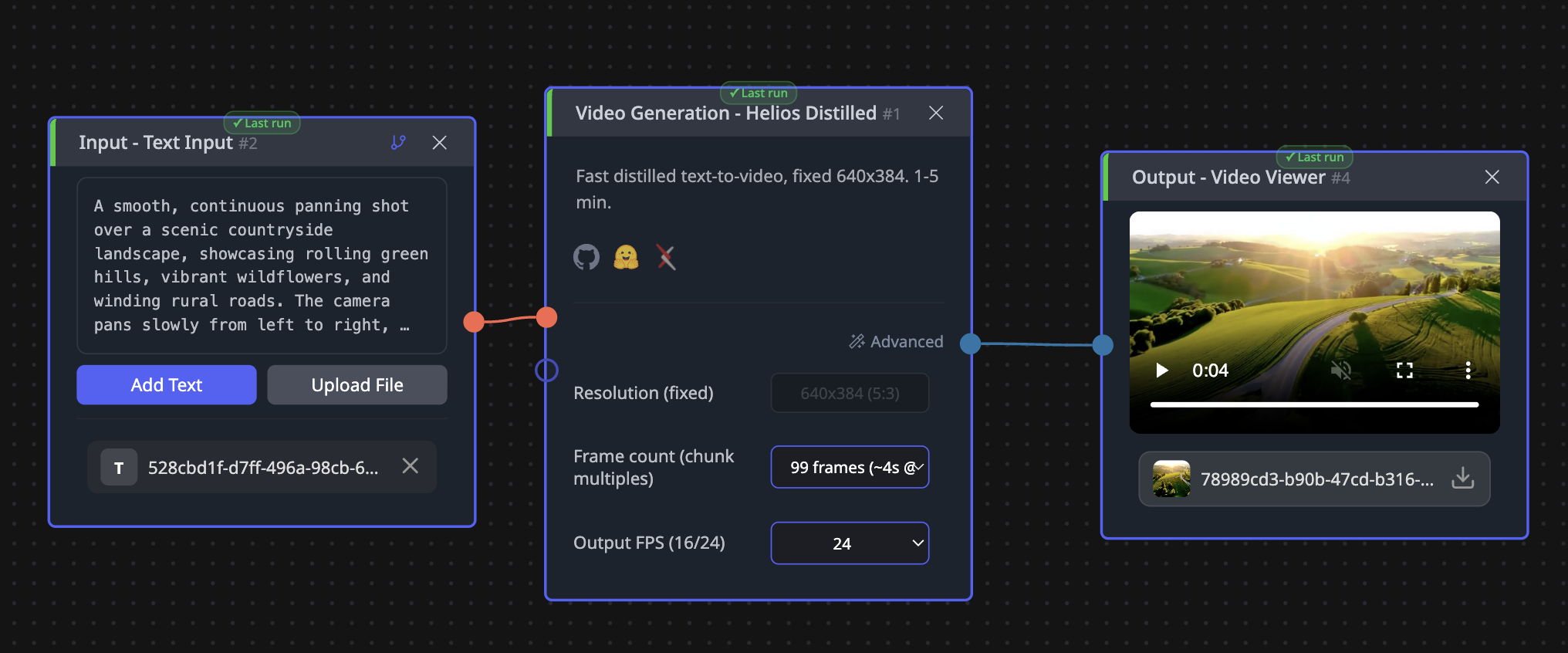
An autoregressive diffusion model that writes video 33 frames at a time, each chunk continuing from the last. That chunking is why the frame-count dropdown offers only multiples: 99 frames is three chunks and roughly four seconds at 24 frames per second, and 1,452 frames is the top of the list at about sixty seconds.
The distillation itself is a different way of predicting each denoising step, paired with a custom schedule, which is what removes the need for the step slider. The team also notes what the design does without: no cached attention, no causal masking, no compressed decoder, no quantisation, and no separate anti-drift machinery. Long clips hold together because of the chunked design rather than because of patches bolted on afterwards.
Three inputs work: text alone, an image plus a description, or an existing clip plus a description. Our documentation adds a caveat the model card does not, that the image and video modes are less consistent than text because training concentrated there. What is left to set is the frame count, the output frame rate at 16 or 24, and a seed for reproducing a result exactly.
What is published, and what is not
There is no benchmark table, for this variant or for any other member of the family. No quality score, no comparison against other video models, nothing to rank against. In a field where video quality is judged by eye anyway, that absence should be stated rather than filled with adjectives.
What is published is speed and scale. The family generates at 19.5 frames per second on a single H100, which is faster than the 24 frames per second the result plays at, and reaches sixty seconds on one GPU rather than a cluster. It runs in bfloat16 and is a fine-tune of an existing 14-billion-parameter video model rather than a fresh design.
Two things to hold onto. Every figure comes from PKU-YuanGroup's own model card with no third-party evaluation. And the 19.5 figure is quoted for the family, not measured separately for this variant, so the honest reading is that this is the fast one and the exact margin over its sibling is not published. In CNAPS Studio, expect minutes rather than seconds either way.
How it compares to the other video generators here
No video generator in the catalog publishes a comparable quality score, so a table here lists specifications rather than a ranking. Length, control and resolution are what actually differ.
Reach for Helios Distilled when you are generating many clips, when you want length without babysitting a quality setting, and when 640 by 384 is fine because something downstream will enlarge it. Reach for Helios Base when one clip matters and you want the resolution presets and the step slider. Reach for Wan2.2 TI2V 5B when you want a short clip at a higher resolution from a far smaller model, and Cosmos3 Nano or MiniMax H3 (Ref2VA) when their input shapes suit what you already have.
What to chain it with
Input is a text description, optionally an image or a clip. Output is an MP4 file, which means the rest of the catalog's video tools take it directly.
Two chains matter, and the first is close to mandatory here. Since resolution is fixed and small, send the result to SparkVSR or FlashVSR-v1.1 to enlarge it, which turns a fast draft into something screen-sized. For social cuts, Subject Follow (9:16) tracks a subject through the generated clip and returns a 1080 by 1920 vertical version with no manual cropping. Video Concat then joins several generated clips into one sequence, which is how you get past sixty seconds.
Open Helios Distilled in CNAPS Studio, generate the same prompt here and on Helios Base at its default settings, and decide whether the difference in the result justifies the difference in the wait.
Sources
- huggingface.co/BestWishYsh/Helios-Distilled for the Apache 2.0 license, the 14 billion parameter count, the distillation approach, the 19.5 frames per second family figure and its hardware, the 33-frame chunking, the sixty-second maximum, the three input modes, and the absence of any benchmark table.
- docs.cnaps.ai/ai-model-hub for the fixed resolution, the frame-count list, the output frame rates, the seed setting, bfloat16 precision, the list of techniques the design avoids, and the note about image and video modes being less consistent than text.