
Apache 2.0, weights free, and at 12 million parameters this is one of the smallest models in the entire catalog. Self-hosting needs only PyTorch, and it will run on a CPU if you are not in a hurry. In your browser it runs on CNAPS Studio, included in the basic plan.
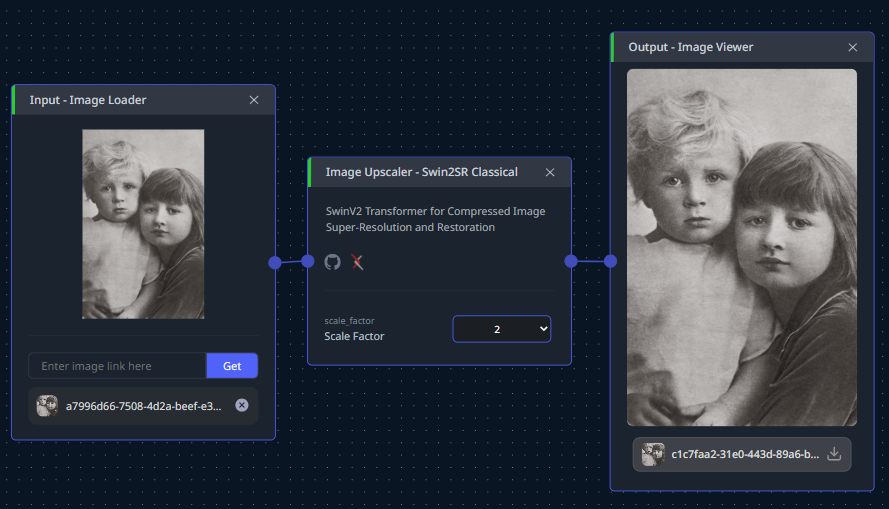
What it does is enlarge a photograph without the blocky, smeared look that ordinary resizing gives you. Rather than duplicating pixels, it reconstructs what the detail probably was, using an attention design that looks at small windows and the whole picture at the same time, so a brick wall keeps its texture and a face keeps its edges.
The cost is that reconstruction is a guess, and the further you push it the more of the result is invention rather than recovery. Four image upscalers sit in the CNAPS Studio catalog and this is the fast, small, general-purpose one for enlarging pictures that are simply too small.
What it actually is
A hierarchical vision transformer built for restoration. A convolution extracts initial features, six residual transformer blocks with shifted-window attention do the real work, and a pixel-shuffle stage assembles the enlarged result. The dimensions are modest: 180 embedding channels and six attention heads.
The V2 in the name refers to three changes that make training behave, and one of them matters at use time. A continuous position encoding lets the model handle a change in resolution smoothly, which is why one set of weights covers 2x, 3x, 4x and 8x rather than needing a separate model per factor. The other two, a rescaled attention calculation and a repositioned normalisation step, are training stability improvements that reached convergence about a third faster.
Training used 8,194 images drawn from four standard photographic datasets, with a loss that combines pixel accuracy and a perceptual term, over two to three days. Input is any colour image at any size; output is the same picture enlarged by the factor you pick.
Parameters12 millionArchitectureSwin Transformer V2, six residual blocksDimensions180 embedding channels, 6 attention headsScale factors2x, 3x, 4x and 8x from one modelTraining data8,194 images from four standard datasetsLossPixel accuracy plus a perceptual termInputAny colour image, any sizePublished2022, at a computer vision workshopLicenseApache 2.0
The published numbers
Four scores, all for four-times enlargement, all measured in decibels of peak signal-to-noise ratio. That metric compares the reconstruction against the true high-resolution original, and higher is better, with each additional decibel meaning a meaningfully closer match. There is no fixed maximum, so the numbers only mean something next to each other.
On Set5, five simple photographs, it scores 32.93. On Set14, a slightly harder set of fourteen, 29.10. On BSD100, a hundred natural scenes, 27.72. On Urban100, a hundred photographs of buildings full of repeating windows and railings, 26.89.
Read the descending order rather than any single figure. The score drops as the pictures get busier, which is the honest shape of this problem: reconstructing a face against a plain background is easier than reconstructing a facade of a hundred identical windows. Urban100 is the number to weigh if your material is architectural or full of fine repeating texture.
These come from the authors and the paper was peer reviewed at a workshop, which sits between a vendor claim and an independent leaderboard. The datasets themselves are public and standard, so the figures are reproducible by anyone who wants to check.
How it compares to the other upscalers here
Swin2SRSwinIRPiSA-SRSMFANet+Size12MAbout 11.8MB of weightsSee its own postSee its own postScale factors2x, 3x, 4x, 8x from one model2x, 3x, 4x, 8x, one model per factorSee its own postSee its own postSet5 at 4x32.93 dB32.92 dBSee its own postSee its own postSet14 at 4x29.10 dBNot published for this scaleSee its own postSee its own postUrban100 at 4x26.89 dBNot published for this scaleSee its own postSee its own postLicenseApache 2.0Apache 2.0See its own postSee its own post
The Set5 row is the only genuine head-to-head, and it is worth reading carefully: 32.93 against 32.92 is a difference of one hundredth of a decibel, which is no difference at all. The two models produce comparable quality on that test, and the real distinction is elsewhere.
That distinction is convenience and speed. Reach for Swin2SR when you want one model that covers every scale factor and trains and runs faster. Reach for SwinIR when you want the older, more heavily cited baseline. Reach for PiSA-SR or SMFANet+ when their own posts suit your material better. And if the input is video rather than a still, SeedVR2 3B is the right shape.
What to chain it with
One image in, a larger image out. That makes it a finishing step for anything in the catalog that produces a picture smaller than you need.
Two chains earn it. Generation output is the common one: FLUX Schnell and FLUX.2 KLEIN 4B both top out at 1024 pixels, and running the result through here at 2x or 4x is what takes a generated image to print or hero-banner size. Archive work is the other: an old scan goes through JPEG Quality Restoration or Image Denoiser first to remove the damage, then through here to enlarge what is left, and cleaning before enlarging matters because otherwise you enlarge the damage too.
Open Swin2SR in CNAPS Studio, run the same photograph at 2x and at 8x, and decide for yourself where reconstruction stops looking like recovery.
Sources
- github.com/mv-lab/swin2sr and arXiv:2209.11345 for the Apache 2.0 license, the 12 million parameter count, the architecture and its V2 changes, the training datasets and schedule, the scale factors, and the four PSNR scores quoted above.
- github.com/JingyunLiang/SwinIR for SwinIR's Set5 score and its per-scale model structure.
- docs.cnaps.ai/ai-model-hub for the CNAPS Studio input and output and the other upscalers in the catalog.