
The checkpoints are free on Hugging Face, but you must accept Meta's SAM License to get them, and it carries trade-control terms: no military or warfare use, no nuclear applications, no espionage, no weapons work. Running it yourself also means Python 3.12 or newer, PyTorch 2.7 or newer, a CUDA 12.6 GPU, and cloning Meta's repository, since there is no Transformers integration instead. To skip all that, it runs in your browser on CNAPS Studio, included in the basic plan.
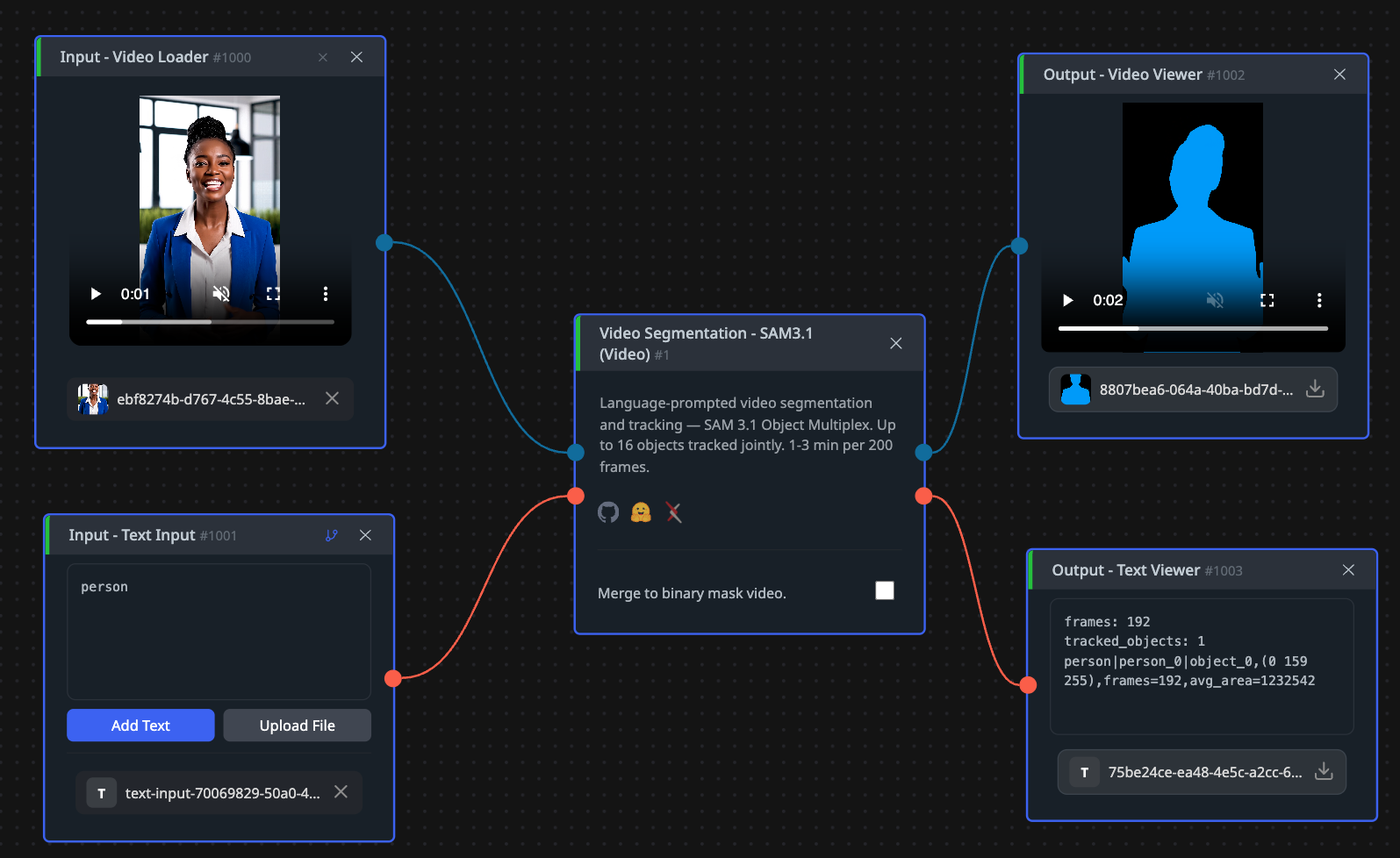
The point of this one is that you describe what to follow instead of drawing it. Type a short phrase, hand it a clip, and every matching object comes back masked on every frame, with an ID that stays attached to the same object throughout. In CNAPS Studio up to 16 objects are tracked together in one pass, which is the part that used to be expensive.
The cost is patience. Reckon on one to three minutes per 200 frames, so this is a background job, not something you sit and watch. Two video segmentation entries sit in the CNAPS Studio catalog, and this is the one that hands you the masks.
What it actually is
A vision encoder reads the frames, a detector conditioned on your text finds every match, a presence head keeps close phrases apart, and a shared memory carries object identity across frames. Meta released it on 27 March 2026.
The change that gives the version its name is Object Multiplex. SAM 3's video pipeline ran a separate tracker per object, so the bill grew in a straight line with the number of things you followed. Object Multiplex groups objects into fixed-capacity buckets and runs each bucket jointly through one shared memory, removing most of the repeated work. The 16-object ceiling in CNAPS Studio is a bucket, not a queue.
One option changes the shape of the output rather than its quality. Merge to binary mask video flattens every instance mask into one black-and-white mask video for the whole concept, which is what a privacy pass wants: one mask covering all the faces, not eleven tracks to recombine.
The published numbers
Meta measured SAM 3.1 against SAM 3 with the same code, which makes it a clean before-and-after. On video object segmentation, scored with J&F out of 100 for how well a mask covers an object and traces its edges, it improved on six of seven benchmarks: 79.6 against 78.4 on MOSEv1, 92.7 against 92.2 on DAVIS17, 89.2 against 88.5 on LVOSv2, 85.1 against 84.4 on SA-V test, and 62.3 against 60.3 on MOSEv2, the hardest of the group.
The text-prompted results are less tidy, and Meta says so. Scored with cgF1 out of 100, which asks whether every instance of a described concept was found and nothing else, the gains are mixed, the clear one being 52.9 against 50.8 on YT-Temporal-1B. The speed result is where the release earns its keep: roughly seven times faster inference at 128 objects on one data-centre GPU, with no accuracy traded for it.
All of it is vendor-reported, from Meta's own release notes, with no independent leaderboard behind it. Note also that the seven-times figure describes tracking a crowd, so a job following one subject sees none of that speedup. Hugging Face recorded just under 64,000 downloads last month.
How it compares to the other video segmentation option here
The comparison inside CNAPS Studio is short, because both video segmentation entries run the same model. Subject Follow (9:16) wraps the same tracker differently: you click one person on a preview frame instead of typing a phrase, and back comes a finished 1080 by 1920 vertical video with the original audio, not masks. The Object Multiplex gain does not apply there, since it only ever follows one subject.
So the choice is about the deliverable, not the accuracy. Take SAM 3.1 (Video) when you need masks as material for something else, when the selection is easier to describe than to click, or when there is more than one thing to follow. Take Subject Follow when the end product is a vertical clip and tracking is only a means to it. If your input is a still image, SAM 3.1 (Scene) does the same job without paying for frames you do not have.
What to chain it with
Input is a clip plus a short phrase, or a point, box, or example mask on a reference frame. Output is per-frame masks with persistent IDs, boxes and confidence scores, or one merged mask video.
Two chains carry most of the value. For a privacy pass, prompt for faces or screens with merging on, split the clip with Video Split, blur the masked regions with Selective Blur, and put it back together with Video Reassemble. For compositing, keep the masks separate and take them into Layer Compose to place the tracked subject over a different plate: rotoscoping without the roto.
Open SAM 3.1 (Video) in CNAPS Studio, run a 200-frame clip with one concept, then the same clip with three, and see what the joint pass actually costs you.
Sources
- The SAM 3.1 release notes in Meta's repository for the release date, Object Multiplex and its bucket design, the video object segmentation and concept segmentation scores against SAM 3, and the seven-times speed figure.
- github.com/facebookresearch/sam3 for the encoder, detector and presence head design, the install requirements, and the SAM License with its trade-control terms.
- huggingface.co/facebook/sam3.1 for the checkpoints, the absence of a Transformers integration, and the monthly download count.
- docs.cnaps.ai/ai-model-hub for the CNAPS Studio input, output, the 16-object ceiling, the merge option, the timing, and the Subject Follow behaviour.