Best Open-Source Runway Alternatives for Short-Form Video: No GPU Required (2026)
Updated October 29, 2026
This guide compares five ways to run open-source video generation models without a GPU of your own: cnaps studio, fal.ai, Replicate, Hugging Face Spaces, and LTX Studio. Each one is compared on which open models it offers, what it costs at low volume, what you give up next to Runway, and how much effort switching takes. In short, open models such as Wan 2.2, LTX-2.5, Cosmos3 Nano, and Helios now produce usable short clips, several of them with generated sound. If you want to try them side by side in a browser, cnaps studio runs six open video models on its free plan. Runway fits better if you want its own Gen-4.5 model, its built-in editing tools, or one subscription for many closed models.
Why people look for an alternative
The reasons fall into four groups, and they lead to different tools.
Cost at volume. Runway runs on monthly credits. The Standard plan is $15 a month, or $12 billed annually, for 625 credits, and those credits refresh each month instead of rolling over. That works well for a few polished clips and less well for dozens of variations a week.
Open weights. Open models can be run on any provider, or on your own hardware later. Some, like Cosmos3 Nano, ship under licenses that allow commercial use.
Model features. Several open models now do things that used to need separate tools: LTX-2.5 and Cosmos3 Nano generate a soundtrack with the video, and Helios produces clips up to 60 seconds long.
Automation. People who produce video at volume want to call a model from a script or an AI assistant, and chain it with other steps such as image generation or upscaling.
How we compared
We compared every tool on the same five fields: what it is best for, how it differs from Runway, what you give up, what it costs at low volume, and how much effort switching takes.
Details for each tool come from its official product, pricing, and documentation pages, checked October 29, 2026. Model specifications for cnaps studio come from our own model documentation and a test run on the same day.
The comparison images in this post show cnaps studio models only. We did not run the other tools for them.
Comparison at a glance
Switching effort is mostly about prompts. A video model has no project files to migrate, but each model responds to prompts differently, so expect a short session of rewriting the prompts you rely on.
The five alternatives
cnaps studio
Best for: finding which open video model suits your content, with nothing to install.
Why choose it over Runway: it puts six open video generation models in one browser workspace, all included on the free plan. Each is built for a different job:
- Wan 2.2 TI2V 5B turns text or a single image into a 5-second 720p clip.
- LTX-2.5 generates a 1920x1088 clip together with a 48 kHz stereo soundtrack.
- Cosmos3 Nano from NVIDIA generates video with synchronized sound and can continue an existing clip, under a license that allows commercial use.
- Helios Base and Helios Distilled produce clips up to 60 seconds long, with Distilled running two to three times faster.
- MiniMax-H3 Ref2VA keeps a subject consistent across shots from a reference image or clip.
You can send the same prompt to several of them at once and line the results up in Video Compare, so the choice comes from your own prompt instead of a vendor's showcase reel.
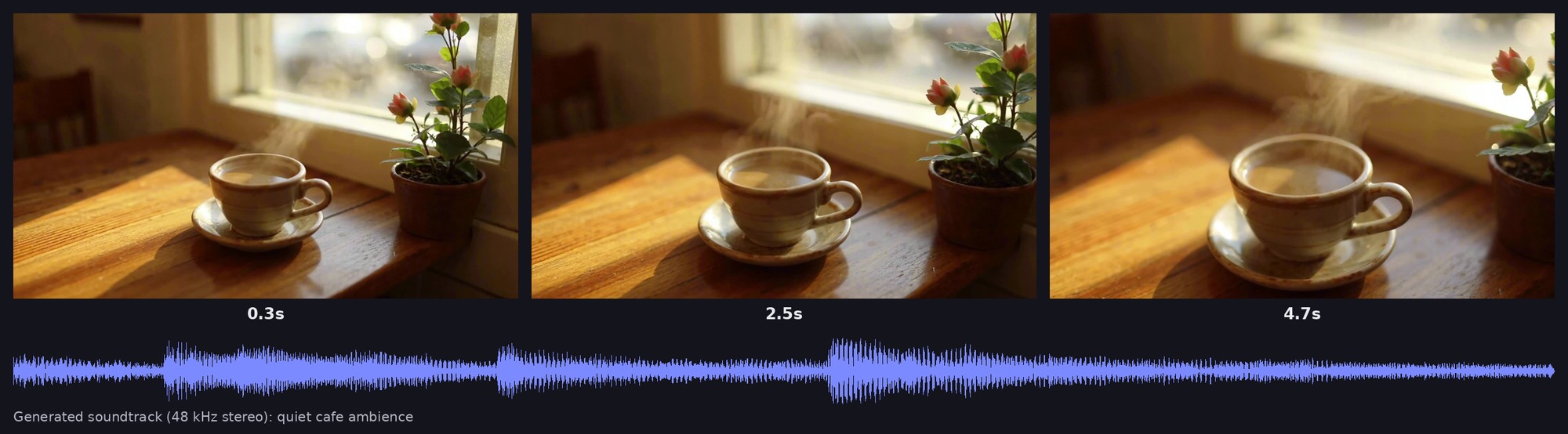
The model followed the camera move, kept the cup, saucer, and table consistent from the first frame to the last, and laid a quiet ambient track under the picture. The clip came back at 1920x1088 with a 5-second, 48 kHz stereo soundtrack in under seven minutes, including time in the queue.
Video generation also connects to everything else on the platform. A single flow can generate a product image, animate it into a clip, and upscale the result with SeedVR2 or FlashVSR in one run. Batch Run, available from the Starter plan, sends a whole set of prompts or images through the same flow, and any flow can be called through the API or MCP, for example straight from Claude.
What you give up: Runway's own Gen-4.5 model, its Aleph editing tools, and closed models from other labs.
Price and limits: the free plan includes all six video models, runs one job at a time, and watermarks output. Paid plans start at $20 a month with Starter, which removes the watermark and adds Batch Run.
Switch if you produce many short clips, want sound generated with the video, or want to test several open models before picking one. Stay on Runway if your work depends on Gen-4.5 or on editing generated footage inside the same app.
Try the open video models in cnaps studio →
fal.ai
Best for: developers who want open video models behind a single API.
Why choose it over Runway: fal hosts many open and closed video models, including several Wan 2.2 and LTX variants, and bills per second or per clip with no monthly plan to fill.
What you give up: a visual editor. fal is an API and a playground, so anything beyond single generations is something you build.
Price and limits: pay as you go. On fal's own pricing, Wan 2.2 A14B costs $0.08 per second of 720p video and the Wan 2.2 5B text-to-video endpoint costs $0.15 per clip.
Switch if you are building video generation into your own product. Stay on Runway if nobody on your team writes code.
Replicate
Best for: developers who want open video models and their own custom models on one platform.
Why choose it over Runway: Replicate hosts open video models from the community and lets you deploy your own with Cog, its packaging tool, so a fine-tuned model can sit next to public ones.
What you give up: a visual editor, and predictable pricing across models, since each model sets its own rate.
Price and limits: billed per run, with pricing listed on each model's page.
Switch if you need a model nobody else hosts, or your own fine-tune. Stay on Runway if you want a finished creative app.
Hugging Face Spaces
Best for: trying a brand-new open model the week it is released.
Why choose it over Runway: many open video models get a free community demo on Hugging Face soon after release, running on shared ZeroGPU hardware with nothing to sign up for.
What you give up: reliability. Demos are built by individuals, queues can be long, and free accounts get only a few minutes of GPU time a day.
Price and limits: free with a daily GPU quota. Hugging Face PRO is $9 a month and raises the quota to 40 minutes a day.
Switch if you want to see what a new model can do before anyone packages it. Stay on Runway if you need to produce client work on a deadline.
LTX Studio
Best for: storyboarded productions built on Lightricks' LTX models.
Why choose it over Runway: LTX Studio is Lightricks' own app for its LTX models, with storyboard and shot-planning tools on top of generation, and its paid plans also include partner models such as Veo, Kling, and Seedance.
What you give up: commercial use on the Free and Lite plans, which are for personal projects only.
Price and limits: new accounts get 800 one-time free credits, and commercial use starts on the Standard plan.
Switch if you plan multi-shot stories and like the LTX look. Stay on Runway if you edit generated footage with Runway's own tools.
When to keep Runway
Some readers should not switch at all.
Keep it if Gen-4.5 is the look your clients expect. Keep it if you edit generated footage with Aleph or Act-Two. And keep it if your team wants closed models such as Veo and Kling alongside Runway's own, under one subscription.
You also do not have to pick one. A common setup is Runway for hero shots and cnaps studio for the volume around them: variations, social cuts, and product clips, where open models and Batch Run keep the cost of each extra clip low. For the argument behind combining models instead of betting on one, see why the future of AI is multi-model.
Before you switch: a short checklist
- Pick five prompts you actually use, including one with a person and one with a product.
- Run the same five on the new tool and on Runway, and count how many attempts each needs before you get a clip you would publish.
- Check sound: whether the model generates it, and whether it matches what you asked for.
- Check the license of each model you plan to use commercially.
- Check clip length, resolution, and aspect ratio against where the video will run.
- Time one full clip from prompt to download.
Run one prompt through several open video models on cnaps studio and compare them in a single Video Compare view.
FAQ
Which open video models can I use on cnaps studio?
Six video generation models are available on every plan, including free: Wan 2.2 TI2V 5B, LTX-2.5, Cosmos3 Nano, Helios Base, Helios Distilled, and MiniMax-H3 Ref2VA. They cover text-to-video, image-to-video, clip continuation, reference-based generation, and clips up to 60 seconds.
Can cnaps studio generate video with sound?
Yes. LTX-2.5 generates a 48 kHz stereo soundtrack together with the video, and Cosmos3 Nano and MiniMax-H3 Ref2VA also generate synchronized audio. Describe the sound you want in the prompt, such as cafe ambience with no speech, so the model does not invent its own.
Can I turn a product photo into a video in cnaps studio?
Yes. Wan 2.2, LTX-2.5, Cosmos3 Nano, and Helios all accept an image as the first frame and animate it from your prompt. You can also chain an image generator in front and a video upscaler such as SeedVR2 after it, and run the whole flow in one step.
Can I generate videos in bulk or from Claude?
Yes. Batch Run is available from the Starter plan and sends a set of prompts or images through the same flow in one go. Every flow can also be called through the API or MCP, so you can ask Claude to generate a clip with a specific model or run a saved flow.
