
FLUX Schnell: a text-to-image model that finishes in four steps, and where to run it
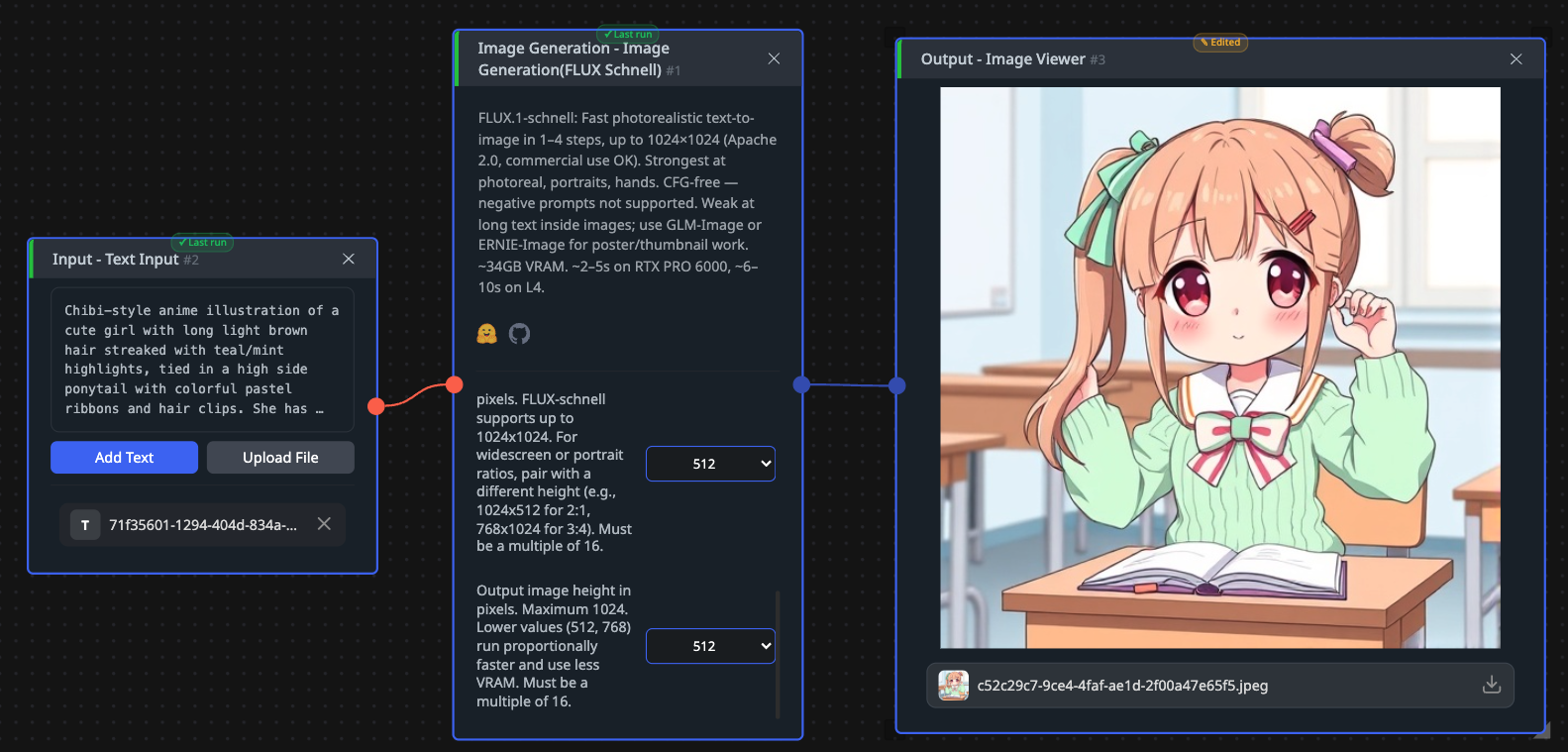
Black Forest Labs released this one under Apache 2.0, which for an image generator is worth pausing on: the weights are free, commercial use is fine, and there is no acceptance step. Self-hosting 12 billion parameters means a GPU with real memory, plus the Hugging Face diffusers library or ComfyUI. In your browser it runs on CNAPS Studio, included in the basic plan.
The distinctive thing is how little work it does per picture. Image models of this quality normally step through twenty to fifty denoising passes. This one was distilled to finish in one to four, and the studio default is four. Fewer passes means less GPU time per image, which is what makes generating in bulk affordable rather than a budget decision.
The cost is that it does one thing. Text goes in, an image comes out, and that is the whole interface: no editing an existing picture, no reference image, no mask. Five image generation models sit in the CNAPS Studio catalog and this is the one to reach for when you need many pictures quickly from scratch.
What it actually is
A 12-billion-parameter rectified flow transformer, which is a design that learns a straighter path from noise to picture than older diffusion models take. That straighter path is what makes a four-step result usable, since each step covers more ground.
Getting there took a distillation step. The short version: a slower, higher-quality teacher model was used to train this one to reach a similar result in a fraction of the passes, with an adversarial component pushing the output to stay sharp rather than going soft the way heavy shortcuts usually do.
Three settings in CNAPS Studio, and that is all. Diffusion steps run from 1 to 8 with a default of 4, and this is the only quality dial. A random seed makes a result reproducible. Output size is a choice of three squares: 512, 768 or 1024 pixels. Prompts are English.
Parameters12 billionArchitectureRectified flow transformerTraining approachAdversarial diffusion distillationSteps per image1 to 8, default 4Output sizes512, 768 or 1024 pixels squareInputText onlyPrompt languageEnglishFrameworksHugging Face diffusers, ComfyUILicenseApache 2.0
What is published, and what is not
There is no benchmark table. No image quality score, no evaluation against other generators, nothing to rank. The vendor describes output as competitive with leading closed commercial services, and that claim carries no number and no test behind it.
What is published is architecture and mechanics: 12 billion parameters, the rectified flow design, the distillation method, the one-to-four step range, and Apache 2.0. Those are facts about how it was built rather than how well it works.
This absence is normal for image generation rather than a mark against this model. There is no agreed benchmark for whether a picture is good, so almost nothing in this category publishes one, and the honest position is that quality here is judged by eye on your own prompts. What you can verify without any of that is the step count, and the step count is the reason to use it.
How it compares to the other image generators here
FLUX SchnellFLUX.2 KLEIN 4BZ-Image-TurboSANA-Sprint 1.6BSize12B, needs a serious GPU4B, runs on a consumer GPUSee its own postSee its own postInputsText onlyText, an image to edit, or several reference imagesSee its own postSee its own postSteps1 to 8, default 41 to 8, default 4See its own postSee its own postOutput sizes512, 768, 1024 square512, 768, 1024 squareSee its own postSee its own postPublished quality scoreNoneNoneNoneNoneLicenseApache 2.0Apache 2.0See its own postSee its own post
Not one model in this category publishes a comparable quality figure, so the table above is a specification sheet and nothing more. Anyone ranking these by number would be inventing the ranking.
The practical split is about what you feed it. Reach for FLUX Schnell when the input is a text prompt and nothing else, and you want many images. Reach for FLUX.2 KLEIN 4B when you also need to edit an existing picture or blend several references, and when a smaller model that fits a consumer card matters. Reach for Z-Image-Turbo, SANA-Sprint 1.6B, DeepGen-1.0, GLM-Image or OmniGen2 when their particular strengths suit the job, and settle it by running the same prompt through two or three of them.
What to chain it with
Text goes in, one image comes out at 1024 pixels or less. That ceiling is what decides most of the chains.
Two are worth building. Upscaling is the common one, since 1024 pixels is small for print or a hero image: PiSA-SR or SMFANet+ takes the result up to a usable size. And because this model cannot edit, pairing it with one that can is the natural next step: generate a base here, then hand it to QWEN-2511 for an instructed change or to QWEN-Inpaint to replace one masked region, keeping the composition you liked.
Open FLUX Schnell in CNAPS Studio, run the same prompt at 1 step and at 8, and find out where on that range your own prompts stop improving.
Sources
- huggingface.co/black-forest-labs/FLUX.1-schnell for the Apache 2.0 license, the 12 billion parameter count, the rectified flow architecture, the distillation approach, the one-to-four step range, the supported frameworks, and the absence of any benchmark table.
- huggingface.co/black-forest-labs/FLUX.2-klein-4B for the comparison column.
- docs.cnaps.ai/ai-model-hub for the CNAPS Studio step range, seed, output sizes and the other image generators in the catalog.