MIT license, weights free, commercial use allowed. The visual tokenizer weights it borrows from another project carry Apache 2.0, which is just as permissive. Self-hosting is heavy: the cnaps studio catalog lists a single GPU with 80GB or more, or several GPUs, and the model card reports about 23GB with CPU offload enabled, through the Hugging Face transformers and diffusers libraries. In your browser it runs on cnaps studio, included in the basic plan.
It is built to put readable words inside a picture. Its decoder carries a dedicated glyph encoder for lettering, and its card publishes text-rendering scores to back that up. Posters, signs, slides and product labels in English or Chinese are the work it is made for.
The cost is time. It runs two models in sequence, the default is 50 steps, and its own authors describe the runtime cost as relatively high without publishing a speed figure. Seven image generation models sit in the cnaps studio catalog, and this is the one to reach for when the picture has to say something.
What it actually is
Two stages. A 9-billion-parameter autoregressive generator, built on a language model, plans the picture as about 256 compact tokens, then expands them to between 1,000 and 4,000 tokens for a 1K to 2K image. A 7-billion-parameter diffusion decoder renders the detail, and its Glyph Encoder handles the letterforms.
Training splits the feedback the same way. Reinforcement learning rewards the generator for overall look and meaning, and the decoder for fine detail and text accuracy, so each stage is tuned for the part it controls.
In cnaps studio you set diffusion steps from 5 to 50, defaulting to 50, a seed, and width and height, defaulting to 1024. Sizes should divide by 32. Beyond text to image, it takes reference images for editing, style transfer, keeping a person's identity, and keeping several subjects consistent. The authors recommend long, specific prompts, with the exact words to render inside quotation marks.
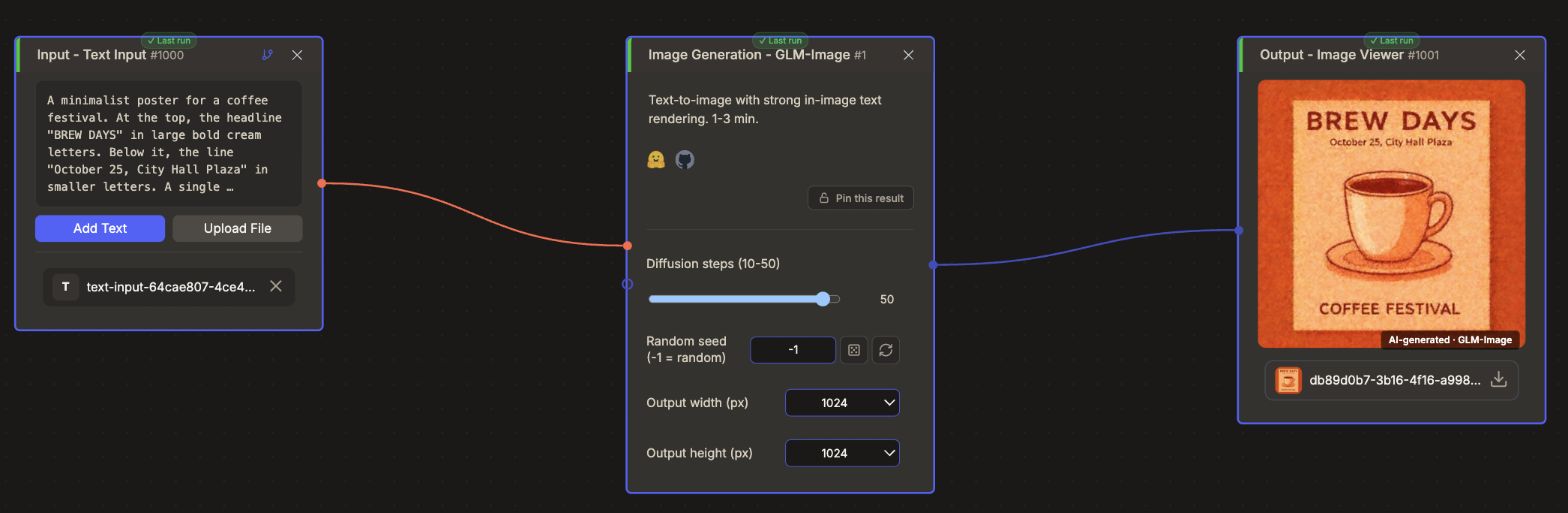
Try GLM-Image in cnaps studio →
The published numbers
The model card scores it on five benchmarks and places Z-Image-Turbo, another model in this catalog, in the same tables, so the pair is directly comparable.
Text is where it leads. On CVTG-2K, which checks the words placed in several regions of one image, word accuracy is 0.9116 against 0.8585. On LongText, which tests long passages, the average is 0.966 against 0.922, with Chinese at 0.979 and English at 0.952.
General prompt following is level. DPG, which tests long, dense prompts, gives 84.78 against 84.86, and OneIG gives an identical 0.528 in English. On CLIPScore, a measure of overall match between image and prompt, Z-Image-Turbo is slightly ahead at 0.8048 against 0.7877.
All of it comes from GLM-Image's own team. The fair reading is a clear lead on text and a draw on everything else.
How it compares to the other image generators here
Only the first two columns share a test, the CVTG-2K and DPG results above. All four licenses allow commercial use.
Reach for GLM-Image when the picture has to carry legible words, from a poster headline to a label. Reach for Z-Image-Turbo for a fast photorealistic image without text demands, OmniGen2 for combining elements from several photos, and DeepGen-1.0 when the instruction needs reasoning. When speed decides, SANA-Sprint 1.6B and FLUX Schnell finish in a handful of steps.
What to chain it with
Text and optional reference images in, one picture out, so it usually starts a chain.
Two chains suit it. Because each run is slow, settle the composition first with a fast generator such as Z-Image-Turbo, then write the final prompt here with the exact words in quotation marks. Afterwards, QWEN-Inpaint fixes one region without touching the lettering, and PiSA-SR or SMFANet+ enlarges the 1024-pixel result for print.
Open GLM-Image in cnaps studio, put a three-word headline in quotation marks, and run it at 50 steps and again at 25 to see where the lettering starts to slip.
FAQ
What does GLM-Image need to run locally?
The cnaps studio catalog lists a single GPU with 80GB or more of memory, or several GPUs, and the model card reports about 23GB with CPU offload enabled. It runs through the transformers and diffusers libraries or SGLang. In cnaps studio it runs in the browser and is included in the basic plan.
How do I get accurate text in a GLM-Image picture?
Put the exact words inside quotation marks in the prompt, as its authors recommend, and describe where they sit and how they look. Long, specific prompts work better than short ones. English and Chinese are both supported, and its published long-text score is higher for Chinese, at 0.979 against 0.952 for English.
Is GLM-Image free for commercial use?
Yes. The model is released under the MIT license, and the visual tokenizer weights it includes carry Apache 2.0, both of which allow commercial use, modification and redistribution. Self-hosting needs a lot of GPU memory, so cnaps studio, where it is included in the basic plan, is the simpler way to try it.
